
Chapter 1: Databasse Management System
Introduction to Data, Database, Database System, DBMS:
Data:
Data refers to a collection of facts, statistics, or information that is represented in a structured or unstructured format. It can be in the form of numbers, text, images, audio, video, or any other form of representation. Data can be processed, analyzed, and interpreted to extract meaningful insights and support decision-making.
Database:
A database is an organized collection of data that is stored and managed in a structured manner. It provides a way to store, retrieve, update, and manage large amounts of data efficiently. Databases are designed to ensure data integrity, security, and consistency. They are used in various applications and industries to store and manage structured information.
Database System:
A database system refers to the combination of a database and the software used to manage and access that database. It includes the database management system and other supporting components. A database system provides an interface for users and applications to interact with the database, perform operations such as querying and updating data, and ensure data integrity and security.
DBMS (Database Management System):
A database management system (DBMS) is a software application that enables users to define, create, manipulate, and manage databases. It provides an interface for users to interact with the database, perform operations such as querying and modifying data, and ensure the integrity and security of the data. DBMSs handle tasks such as data storage, retrieval, concurrency control, transaction management, and data backup and recovery.
In summary, data is the collection of facts or information, a database is an organized collection of data, a database system is the combination of a database and its management software, and a DBMS is the software application used to manage and access the database.
Advantages of Using DBMS:
Database Management Systems (DBMS) offer several advantages in managing and organizing data effectively. Here are some key advantages of using DBMS:
1. Data Integration and Centralization:
DBMS allows for the centralization of data, where multiple users and applications can access and manage data from a single source. This eliminates data redundancy and inconsistency, ensuring that all users work with consistent and up-to-date information.
2. Data Security and Access Control:
DBMS provides robust security mechanisms to protect data from unauthorized access, ensuring data confidentiality, integrity, and availability. Access controls can be implemented to restrict user access to specific data or functionalities based on user roles and privileges.
3. Data Consistency and Integrity:
DBMS enforces data integrity constraints, such as uniqueness, referential integrity, and domain constraints, to maintain data consistency and accuracy. It prevents the entry of invalid or inconsistent data, ensuring the reliability of the stored information.
4. Data Backup and Recovery:
DBMS offers built-in mechanisms for data backup and recovery, allowing for the creation of data backups and the ability to restore data in case of system failures, errors, or data corruption. This helps to protect valuable data and minimize the risk of data loss.
5. Data Sharing and Collaboration:
DBMS enables data sharing and collaboration among multiple users and applications. It provides concurrent access to data, allowing multiple users to access and modify the data simultaneously, ensuring data consistency and coordination.
6. Data Scalability and Performance:
DBMS is designed to handle large volumes of data efficiently. It provides optimization techniques, indexing, and caching mechanisms to improve data retrieval and query performance, ensuring scalability as data grows.
7. Data Independence:
DBMS offers data independence, allowing changes to the database structure (schema) without affecting the applications using the database. This provides flexibility in adapting to evolving business requirements and simplifies database maintenance.
In summary, DBMS provides advantages such as data integration, security, consistency, backup and recovery, sharing and collaboration, scalability, performance, and data independence, making it a valuable tool for managing and organizing data effectively.
Field, Record, Objects, Primary Key, Alternate Key, Candidate Key:
Field:
A field refers to a single piece of data within a database or a record. It represents a specific attribute or characteristic of an entity. For example, in a database of employees, fields could include employee ID, name, date of birth, and salary. Each field has a specific data type and represents a specific piece of information.
Record:
A record, also known as a row or tuple, is a collection of related fields that represents a complete set of information about an entity or an object. In a database, a record represents a single instance or occurrence of an entity. For example, in a database of students, each record would contain fields such as student ID, name, address, and contact information for a specific student.
Objects:
In the context of databases, objects typically refer to complex data structures or entities that can be stored and manipulated within the database. Objects can encapsulate data and associated behaviors or methods. Object-oriented databases (OODBs) are specifically designed to work with objects, allowing for more advanced data modeling and manipulation capabilities compared to traditional relational databases.
Primary Key:
A primary key is a unique identifier for a record in a database table. It ensures that each record can be uniquely identified and serves as a reference point for linking and retrieving data from related tables. A primary key must have a unique value for each record and cannot contain null values. It provides a way to enforce data integrity and establish relationships between tables in a relational database.
Alternate Key:
An alternate key, also known as a secondary key, is a candidate key that is not chosen as the primary key. In a database table, there can be multiple alternate keys that can uniquely identify a record. While they are not used as the primary means of identifying records, alternate keys can still be used to ensure data uniqueness and serve as additional indexing or searching criteria.
Candidate Key:
A candidate key is a field or a combination of fields in a database table that can uniquely identify each record. It is a potential candidate for being selected as the primary key. A candidate key must satisfy the uniqueness and minimality criteria, meaning that it must have a unique value for each record, and no subset of its fields can also uniquely identify records. Multiple candidate keys may exist in a table, and one of them is chosen as the primary key.
In summary, a field represents a single piece of data, a record is a collection of related fields, objects are complex data structures, a primary key uniquely identifies a record, an alternate key is a secondary unique identifier, and a candidate key is a potential primary key choice.
DDL (Data Definition Language) and DML (Data Manipulation Language):
DDL (Data Definition Language):
Data Definition Language (DDL) is a set of SQL (Structured Query Language) statements used to define and manage the structure or schema of a database. DDL focuses on defining and modifying database objects such as tables, views, indexes, and constraints. Some commonly used DDL statements include:
CREATE:
The 'CREATE' statement is used to create new database objects such as tables, views, indexes, or schemas. The syntax for creating a table is as follows:
CREATE TABLE table_name (column1 datatype, column2 datatype, ...);
ALTER:
The 'ALTER' statement is used to modify the structure of existing database objects. It allows you to add, modify, or delete columns, constraints, or indexes in a table, for example. The syntax for adding a column to a table is as follows:
ALTER TABLE table_name ADD column_name datatype;
DROP:
The 'DROP' statement is used to delete or remove existing database objects such as tables, views, indexes, or schemas. The syntax for dropping a table is as follows:
DROP TABLE table_name;
TRUNCATE:
The 'TRUNCATE' statement is used to remove all data from a table while keeping its structure intact. The syntax for truncating a table is as follows:
TRUNCATE TABLE table_name;
DML (Data Manipulation Language):
Data Manipulation Language (DML) is a set of SQL statements used to manipulate or interact with the data within a database. DML statements focus on retrieving, inserting, updating, and deleting data in database tables. Some commonly used DML statements include:
SELECT:
The 'SELECT' statement is used to retrieve data from one or more database tables based on specified conditions. It is used for querying and retrieving data from the database. The syntax for selecting data from a table is as follows:
SELECT column1, column2, ... FROM table_name WHERE condition;
INSERT:
The 'INSERT' statement is used to insert new rows or records into a database table, providing the values for the columns of the table. The syntax for inserting data into a table is as follows:
INSERT INTO table_name (column1, column2, ...) VALUES (value1, value2, ...);
UPDATE:
The 'UPDATE' statement is used to modify or update existing data in a database table. It allows you to change the values of specific columns based on specified conditions. The syntax for updating data in a table is as follows:
UPDATE table_name SET column1 = value1, column2 = value2, ... WHERE condition;
DELETE:
The 'DELETE' statement is used to delete specific rows or records from a database table based on specified conditions. The syntax for deleting data from a table is as follows:
DELETE FROM table_name WHERE condition;
In summary, DDL (Data Definition Language) is used to define and manage the structure or schema of a database, including creating, modifying, or deleting database objects. On the other hand, DML (Data Manipulation Language) is used to manipulate or interact with the data within the database, including retrieving, inserting, updating, and deleting data.
Database Models: Network Model, Hierarchical Model, Relational Database Model
Network Model:
The Network Model is a database model that represents data in a network-like structure. It is based on the concept of records and sets of relationships between them. In this model, data is organized as a collection of records connected through pointers or links. Each record can have multiple parent and child records, allowing for complex relationships. The Network Model was popular in the 1960s and 1970s and was used to model hierarchical data structures.
Hierarchical Model:
The Hierarchical Model is a database model that represents data in a tree-like structure with a strict one-to-many relationship between records. In this model, data is organized in a hierarchical manner, where each record has a single parent record and zero or more child records. The hierarchical structure is suitable for representing parent-child relationships and is commonly used in file systems and organizational structures. The Hierarchical Model was widely used in the early days of database management systems.
Relational Database Model:
The Relational Database Model is a database model based on the concept of tables, rows, and columns. It represents data as a collection of related tables, where each table consists of rows (records) and columns (attributes). The relationships between tables are established through keys, such as primary keys and foreign keys. The Relational Database Model provides a flexible and powerful way to organize and query data, allowing for efficient storage, retrieval, and manipulation of structured information. It is the most widely used database model in modern database management systems.
In summary, the Network Model organizes data in a network-like structure with multiple relationships, the Hierarchical Model represents data in a tree-like structure with strict parent-child relationships, and the Relational Database Model organizes data in tables with relationships established through keys.
Concept of Normalization: 1NF, 2NF, 3NF
1NF (First Normal Form):
First Normal Form (1NF) is the basic level of normalization that ensures the elimination of duplicate data and the organization of data into atomic values. In 1NF, each column of a table should contain only atomic (indivisible) values, and there should be a unique identifier for each row. Here's an example of a table that violates 1NF:
| Student ID | Student Name | Course |
|---|---|---|
| 1 | Santosh | Math, Physics |
| 2 | Hari | Chemistry |
To convert this table into 1NF, we need to remove the multiple values in the 'Course' column and create a separate row for each course taken by a student:
| Student ID | Student Name | Course |
|---|---|---|
| 1 | Santosh | Math |
| 1 | Santosh | Physics |
| 2 | Hari | Chemistry |
2NF (Second Normal Form):
Second Normal Form (2NF) builds upon 1NF and addresses the issue of partial dependencies in a table. A table is in 2NF if it is in 1NF and all non-key attributes depend fully on the entire primary key. Here's an example of a table that violates 2NF:
| Order ID | Product Name | Product Category |
|---|---|---|
| 1 | iPhone X | Mobile Phones |
| 1 | MacBook Pro | Laptops |
In this example, the 'Product Category' attribute depends on the 'Product Name' attribute, which is a partial dependency. To convert this table into 2NF, we need to separate the dependent attributes into a separate table:
| Order ID | Product Name |
|---|---|
| 1 | iPhone X |
| 1 | MacBook Pro |
| Product Name | Product Category |
|---|---|
| iPhone X | Mobile Phones |
| MacBook Pro | Laptops |
3NF (Third Normal Form):
Third Normal Form (3NF) builds upon 2NF and addresses the issue of transitive dependencies in a table. A table is in 3NF if it is in 2NF and all non-key attributes depend only on the primary key and not on other non-key attributes. Here's an example of a table that violates 3NF:
| Employee ID | Employee Name | Department | Department Location |
|---|---|---|---|
| 1 | Ram | Accounting | New York |
| 2 | Shyam | Marketing | Los Angeles |
In this example, the 'Department Location' attribute depends on the 'Department' attribute, which is a transitive dependency. To convert this table into 3NF, we need to separate the dependent attributes into a separate table:
| Employee ID | Employee Name | Department |
|---|---|---|
| 1 | Ram | Accounting |
| 2 | Shyam | Marketing |
| Department | Department Location |
|---|---|
| Accounting | New York |
| Marketing | Los Angeles |
In summary, normalization (1NF, 2NF, 3NF) is a process of organizing data in a database to eliminate data redundancy and improve data integrity. Each level of normalization has specific rules and criteria to ensure data is properly structured and dependencies are appropriately handled.
Centralized vs Distributed Database
A centralized database and a distributed database are two different approaches to storing and managing data. Here's a comparison of the key characteristics of each:
| Centralized Database | Distributed Database |
|---|---|
|
|
In a centralized database, all data is stored in a single location, and there is a central authority responsible for managing and controlling the database. Users access the data from this central location, and the database provides a unified view of the data. This approach is easier to maintain and manage since there is a single point of control.
In contrast, a distributed database consists of multiple database systems that are spread across different locations. Each database system is controlled and maintained by its own authority. Users can access data from multiple locations, and the database provides a fragmented view of the data. Managing a distributed database is more complex as it requires coordination between multiple authorities and handling data synchronization and consistency.
Both centralized and distributed databases have their advantages and considerations. The choice between them depends on factors such as data availability, scalability, data security, and the specific requirements of the application or organization.
Database Security
Database security is a critical aspect of maintaining the confidentiality, integrity, and availability of data stored in a database. It involves implementing various security measures to protect the database from unauthorized access, data breaches, and other security threats. Here are some important considerations and measures for ensuring database security:
Access Control:
Access control mechanisms are used to restrict and manage user access to the database. This includes implementing authentication and authorization mechanisms to ensure that only authorized users can access the database and perform specific actions. User roles and privileges should be defined and enforced to control access at various levels.
Data Encryption:
Data encryption is the process of converting sensitive data into an unreadable form to protect it from unauthorized access. Encryption techniques, such as symmetric and asymmetric encryption, can be used to encrypt data at rest and in transit. This helps in safeguarding the confidentiality of sensitive information stored in the database.
Auditing and Logging:
Auditing and logging mechanisms should be implemented to track and monitor activities within the database. This involves recording user actions, database modifications, and system events. Audit logs can be used for forensic analysis, identifying security breaches, and detecting suspicious activities.
Backup and Recovery:
Regular database backups should be performed to ensure data availability and facilitate recovery in the event of data loss or system failures. Backups should be securely stored and tested for restoration. Additionally, disaster recovery plans and procedures should be in place to minimize downtime and ensure business continuity.
Vulnerability Management:
Regular vulnerability assessments and patch management are essential to identify and address potential security vulnerabilities in the database system. This includes keeping the database software up to date with the latest security patches and fixes, as well as regularly scanning for vulnerabilities and applying necessary security measures.
Data Masking and Anonymization:
Data masking and anonymization techniques can be employed to protect sensitive data by substituting or masking personally identifiable information (PII) with fictional or generalized values. This helps in minimizing the risk of data exposure and maintaining privacy.
Physical Security:
Physical security measures, such as securing server rooms, restricting physical access to database servers, and implementing surveillance systems, are important for protecting the physical infrastructure that houses the database servers.
Implementing a comprehensive database security strategy involves a combination of technical controls, policies, procedures, and user awareness. It requires regular monitoring, updating security measures, and staying vigilant against evolving security threats.
Chapter 2: Data Communication and Networking
Basic Elements of a Communication System
A communication system is a framework that allows the transmission and reception of information between two or more parties. It involves various components that work together to ensure effective communication. Here are the basic elements of a communication system:
1. Transmitter:
The transmitter is the device or system that converts the information or message into a suitable form for transmission. It encodes the message into a signal that can be transmitted through a communication channel. Examples of transmitters include microphones, cameras, and modulators.
2. Communication Channel:
The communication channel is the medium through which the encoded signal is transmitted from the transmitter to the receiver. It can be wired or wireless and may include physical mediums such as cables, fiber optics, or wireless mediums such as radio waves or satellite links.
3. Receiver:
The receiver is the device or system that captures the transmitted signal from the communication channel. It decodes the received signal back into the original message or information. Examples of receivers include speakers, displays, and demodulators.
4. Noise:
Noise refers to any unwanted disturbances or interference that affects the quality of the transmitted signal. It can arise from various sources such as electromagnetic interference, background noise, or signal distortions. Noise can degrade the signal and impact the accuracy of the communication.
5. Encoder and Decoder:
Encoders and decoders are components that perform the encoding and decoding processes, respectively. Encoders convert the message into a suitable signal format for transmission, while decoders reverse the process and extract the original message from the received signal.
6. Modulation:
Modulation is the process of modifying the characteristics of a carrier signal to carry the information being transmitted. It involves changing the amplitude, frequency, or phase of the carrier signal based on the input message. Modulation techniques include amplitude modulation (AM), frequency modulation (FM), and phase modulation (PM).
7. Demodulation:
Demodulation is the process of extracting the original message from the modulated carrier signal at the receiver end. It involves reversing the modulation process and recovering the original signal by detecting and interpreting the variations in the carrier signal.
8. Feedback:
Feedback is a mechanism that allows the receiver to provide information or acknowledgement back to the transmitter. It helps in ensuring the reliability and accuracy of the communication by enabling error detection and correction.
These basic elements form the foundation of a communication system and are essential for the successful transmission and reception of information between the sender and the receiver.
Communication Modes: Simplex, Half Duplex, and Full Duplex
In the field of telecommunications and computer networking, different communication modes are used to define the direction and flow of data transmission between communicating devices. The three main communication modes are simplex, half duplex, and full duplex. Let's explore each mode:
| Communication Mode | Description | Example |
|---|---|---|
| Simplex | In simplex mode, communication is unidirectional, meaning data can only flow in one direction. One device acts as the transmitter, and the other device acts as the receiver. The receiver can only receive data and cannot send a response back. | Television broadcasting, where the viewers can only receive the broadcasted content and cannot send any feedback or responses. |
| Half Duplex | In half duplex mode, communication is bidirectional but not simultaneous. Devices can both transmit and receive data, but not at the same time. Each device takes turns to transmit and receive data. | Two-way radios, where users must press a button to switch between transmitting and receiving modes. |
| Full Duplex | In full duplex mode, communication is bidirectional and simultaneous. Devices can transmit and receive data at the same time, allowing for real-time, two-way communication. | Telephone conversations, where both parties can speak and listen simultaneously. |
It's important to choose the appropriate communication mode based on the requirements of the specific application. Simplex mode is suitable for scenarios where data needs to be transmitted in one direction only. Half duplex mode is useful when two-way communication is required but not simultaneously. Full duplex mode enables real-time, simultaneous communication between devices.
Concept of LAN and WAN
LAN and WAN are two common types of computer networks that serve different purposes and cover different geographical areas. Let's understand the concepts of LAN (Local Area Network) and WAN (Wide Area Network):
Local Area Network (LAN):
A LAN is a computer network that covers a small geographical area, typically within a single building or a group of nearby buildings. It connects computers and devices in close proximity, allowing them to share resources, such as files, printers, and internet access. LANs are commonly used in homes, offices, schools, and other small-scale environments.
Key characteristics of a LAN include:
- Limited geographical area
- High data transfer rates
- Low latency and minimal network delays
- Private ownership and control
- Common network protocols and technologies, such as Ethernet
LANs are typically established and managed by individuals or organizations to facilitate efficient local communication and resource sharing among connected devices.
Wide Area Network (WAN):
A WAN is a computer network that covers a large geographical area, spanning multiple cities, countries, or even continents. It connects multiple LANs or other networks together, allowing for long-distance communication and data exchange. WANs are often established by service providers or telecommunications companies.
Key characteristics of a WAN include:
- Expansive geographical coverage
- Lower data transfer rates compared to LANs
- Higher latency and increased network delays
- Public or private ownership
- Reliance on various network protocols and technologies, such as leased lines, satellites, and routers
WANs enable organizations to connect their remote locations, branch offices, and data centers, providing access to centralized resources, such as databases, servers, and cloud services. They are designed to facilitate communication over longer distances and across different networks.
In summary, LANs are local networks that cover a small area and are used for local communication and resource sharing, while WANs are wide networks that span large areas, connecting multiple LANs and facilitating long-distance communication.
Transmission Medium: Guided and Unguided
In telecommunications and computer networks, the transmission medium refers to the physical pathway or channel through which data is transmitted from one device to another. There are two main types of transmission media: guided and unguided. Let's explore each type:
Guided Transmission Medium:
Guided transmission media, also known as bounded or wired media, are physical mediums that provide a direct and controlled path for data transmission. These media use cables or wires to transmit signals between devices. Here are some examples of guided transmission media:
| Medium | Description |
|---|---|
| Twisted Pair Cable | A type of cable that consists of pairs of insulated copper wires twisted together. It is commonly used for Ethernet networking. |
| Coaxial Cable | A cable that consists of a central conductor surrounded by an insulating layer, a metal shield, and an outer insulating layer. It is used for cable TV and broadband internet connections. |
| Fiber Optic Cable | A cable that transmits data as pulses of light through optical fibers made of glass or plastic. It offers high bandwidth and is used for long-distance communication. |
Guided transmission media provide a secure and controlled environment for data transmission, as the signals are confined within the physical boundaries of the cables or wires.
Unguided Transmission Medium:
Unguided transmission media, also known as unbounded or wireless media, do not rely on physical cables or wires to transmit signals. Instead, they use wireless communication technologies to transmit data through the air or space. Here are some examples of unguided transmission media:
| Medium | Description |
|---|---|
| Radio Waves | Electromagnetic waves that are used for various wireless communication applications, such as radio broadcasting and Wi-Fi. |
| Microwaves | High-frequency electromagnetic waves that are used for point-to-point communication, such as microwave links for long-distance transmission. |
| Infrared | Electromagnetic waves with shorter wavelengths than radio waves. Infrared is used for short-range communication, such as remote controls and infrared data transfer. |
Unguided transmission media allow for wireless communication, enabling devices to transmit and receive signals without the need for physical connections. They offer mobility and flexibility but may be susceptible to interference and signal degradation due to environmental factors.
In summary, guided transmission media use physical cables or wires to transmit data, providing a controlled pathway for communication. On the other hand, unguided transmission media employ wireless technologies to transmit signals through the air or space, enabling wireless communication between devices.
Transmission Impairments Terminology
Transmission impairments refer to the degradation or disturbances that can occur during the transmission of data over a communication system. Understanding these impairments is crucial for maintaining the quality and reliability of data transmission. Let's explore some common terminologies related to transmission impairments:
| Term | Description |
|---|---|
| Jitter | Variances in the timing of received signals, causing small but rapid fluctuations in the signal's arrival time. Jitter can result in data errors and affect the quality of real-time applications. |
| Singing | Undesirable oscillations or ringing in the transmitted signal, typically caused by improper impedance matching or reflections in the transmission line. Singing can distort the signal and lead to data errors. |
| Echo | The reflection of a portion of the transmitted signal back to the sender, resulting in a delayed and attenuated version of the original signal. Echoes can cause communication issues and interfere with the clarity of voice and audio signals. |
| Crosstalk | Undesired coupling or interference between adjacent communication channels or transmission lines. Crosstalk can cause signal distortion and data corruption, especially in scenarios where multiple signals are transmitted simultaneously. |
| Distortion | Alteration or deformation of the original signal waveform during transmission. Distortion can result from various factors, such as noise, interference, attenuation, or non-linearities in the transmission medium. It can affect the accuracy and integrity of the received data. |
| Noise | Unwanted or random electrical signals that interfere with the desired signal during transmission. Noise can arise from various sources, such as electrical interference, thermal noise, or electromagnetic radiation. It can degrade the signal quality and introduce errors. |
| Bandwidth | The range of frequencies or the capacity of a communication channel to carry data. Bandwidth determines the maximum data rate that can be transmitted. Insufficient bandwidth can lead to data loss or reduced transmission quality. |
| Number of Receivers | The count of devices or receivers connected to a transmission medium. The number of receivers can impact the signal strength, as well as introduce signal attenuation or degradation, particularly in scenarios where multiple receivers share the same medium. |
Understanding these terminologies helps in diagnosing and addressing transmission issues, implementing appropriate mitigation strategies, and ensuring reliable data transmission across communication systems.
Basic Concepts of Network Architecture: Client-Server and Peer-to-Peer
Network architecture refers to the structure and organization of a computer network, defining how devices and resources are interconnected and how information is exchanged. Two fundamental concepts of network architecture are the client-server model and the peer-to-peer model.
1. Client-Server Architecture:
In a client-server architecture, the network consists of two types of entities: clients and servers. The clients are end-user devices such as desktop computers, laptops, smartphones, or tablets. The servers are powerful computers or dedicated network devices that provide services, resources, or data to clients upon request.
The key characteristics of the client-server architecture are:
- Centralized Control:The server has centralized control and manages the network resources.
- Client-Server Relationship:Clients make requests to the server for services or data, and the server responds to those requests.
- Specialized Functions:Servers are designed to perform specific functions, such as file storage, database management, web hosting, email services, etc.
- Scalability:Client-server networks can scale easily by adding more servers to handle increased client requests or to distribute the load.
- Security and Access Control:Servers can enforce security measures and control access to resources, ensuring data integrity and confidentiality.
2. Peer-to-Peer Architecture:
In a peer-to-peer architecture, all devices or nodes in the network can act as both clients and servers. Each device has its own resources and can directly communicate and share files or services with other devices without relying on a centralized server.
The key characteristics of the peer-to-peer architecture are:
- Decentralized Control:There is no central server controlling the network; each device operates independently.
- Equal Peers:All devices in the network have equal capabilities and can share resources with other devices.
- Distributed Services:Devices can provide services or resources to other devices and can also request services or resources from other devices.
- Dynamic Network:Devices can join or leave the network at any time, making the network more flexible and adaptable.
- Scalability:Peer-to-peer networks can scale well as more devices are added, increasing the overall resource pool.
- Reliance on Bandwidth and Processing Power:Since each device directly communicates with others, the performance of the network depends on the available bandwidth and processing power of individual devices.
Both client-server and peer-to-peer architectures have their own advantages and are suitable for different types of networks and applications. Understanding these concepts helps in designing and implementing network solutions that best fit the specific requirements and goals of an organization or individual users.
IP Address, Subnet Mask, Gateway, MAC Address, Internet, Intranet, Extranet
Understanding the concepts of IP address, subnet mask, gateway, MAC address, Internet, intranet, and extranet is essential in the world of computer networks and connectivity. Let's explore each of these concepts:
1. IP Address:
An IP (internet Protocol) address is a unique numerical identifier assigned to each device connected to a network. It enables devices to communicate and identify each other on an IP-based network, such as the Internet or a local area network (LAN). IP addresses can be either IPv4 (32-bit) or IPv6 (128-bit) and are typically represented as a series of four or eight groups of numbers, respectively.
2. Subnet Mask:
A subnet mask is a 32-bit value used to divide an IP address into network and host portions. It determines which part of the IP address represents the network and which part represents the host. The subnet mask is used in conjunction with the IP address to identify the network to which a device belongs.
3. Gateway:
A gateway, also known as a default gateway, is a network node or device that serves as an access point or entrance to another network. It acts as an intermediary between devices on a local network and devices on external networks, such as the Internet. The gateway is responsible for routing network traffic between different networks, allowing devices to communicate with resources outside their own network.
4. MAC Address:
A MAC (Media Access Control) address is a unique identifier assigned to the network interface card (NIC) of a device. It is a hardware address that is permanently assigned by the manufacturer and is used to identify a device on a local network. MAC addresses are typically represented as a series of six pairs of hexadecimal digits (e.g., 00:1A:2B:3C:4D:5E).
5. Internet:
The Internet is a global network of interconnected networks that allows devices and computers worldwide to communicate with each other. It is a public network that provides access to a vast range of resources, services, and information available on websites, email servers, file servers, and other online platforms.
6. Intranet:
An intranet is a private network within an organization that uses Internet protocols and technologies to facilitate internal communication, collaboration, and information sharing. It is accessible only to authorized users within the organization and is used for internal purposes such as sharing documents, company resources, and internal communication.
7. Extranet:
An extranet is a controlled private network that extends beyond the boundaries of an organization to include external users, such as business partners, suppliers, or customers. It allows authorized external entities to access specific resources, collaborate, and exchange information with the organization in a secure manner.
These concepts form the foundation of network connectivity and play crucial roles in ensuring effective communication and data transfer between devices and networks.
Network Tools: Packet Tracer and Remote Login
Network tools are essential for managing and troubleshooting computer networks. Two commonly used network tools are Packet Tracer and Remote Login. Let's understand their functionalities:
1. Packet Tracer:
Packet Tracer is a network simulation tool developed by Cisco Systems. It provides a virtual environment for designing, configuring, and simulating network setups. With Packet Tracer, network administrators and students can create network topologies, configure network devices, and simulate network traffic to test various scenarios. It is widely used for learning and practicing networking concepts, as well as for troubleshooting network issues in a safe virtual environment.
2. Remote Login:
Remote login, also known as remote access or remote desktop, is a network tool that allows users to connect to and control a remote computer or server over a network connection. It enables users to access resources, applications, and files on a remote system as if they were physically present at the remote location. Remote login is particularly useful for system administrators who need to manage and troubleshoot remote computers or servers without being physically present at the location. It facilitates remote administration, support, and collaboration, saving time and effort in accessing and managing remote systems.
Both Packet Tracer and Remote Login are valuable tools in the field of networking, providing capabilities for network simulation and remote access, respectively. They enhance network management, troubleshooting, and learning experiences, contributing to efficient network operations and administration.
NIC, Modem, Router, Switch
Networking devices play a crucial role in connecting and facilitating communication between devices within a computer network. Let's explore the functions of four essential networking devices: NIC, modem, router, and switch.
1. NIC (Network Interface Card):
A Network Interface Card (NIC), also known as a network adapter, is a hardware component that enables a device to connect to a network. It provides the physical interface between a device, such as a computer or a server, and the network medium, such as Ethernet cables or wireless signals. The NIC converts data from the device into a format that can be transmitted over the network and vice versa. It typically has a unique MAC address assigned to it, which serves as its identifier on the network.
2. Modem:
A modem (modulator-demodulator) is a device that allows devices to transmit and receive data over different communication channels. In the context of networking, a modem is primarily used to connect to the Internet. It converts digital signals from a device into analog signals that can be transmitted over telephone lines, cable lines, or fiber optic lines. The modem at the receiving end then converts the analog signals back into digital signals for the receiving device to understand. Modems are commonly used for broadband Internet connections, such as DSL (Digital Subscriber Line) or cable Internet.
3. Router:
A router is a networking device that forwards data packets between different networks. It acts as a central hub and enables communication between devices on different networks, such as local area networks (LANs) or wide area networks (WANs). Routers use IP addresses to determine the most efficient path for data transmission and can make decisions based on network protocols, such as TCP/IP. They play a critical role in directing network traffic, ensuring data reaches its intended destination, and implementing network security features, such as firewall protection.
4. Switch:
A switch is a networking device that connects multiple devices within a local network. It operates at the data link layer (Layer 2) of the OSI model and uses MAC addresses to forward data packets to the correct destination. Switches create a network segment, allowing devices to communicate with each other within the same network. They provide dedicated bandwidth to each connected device, resulting in faster and more efficient data transfer compared to shared network connections. Switches are commonly used in LAN environments to connect computers, printers, servers, and other network devices.
These networking devices, including NICs, modems, routers, and switches, form the backbone of computer networks, enabling connectivity, data transmission, and efficient communication between devices.
Bus, Ring, and Star Topology
Network topology refers to the physical or logical layout of devices and connections in a computer network. Let's explore three commonly used network topologies: bus, ring, and star.
1. Bus Topology:
In a bus topology, devices in a network are connected to a single communication line, known as a bus. The bus serves as a shared communication medium that all devices on the network can access. Each device connects to the bus using a drop line or a tap. Data transmitted by any device is received by all devices on the bus, but only the intended recipient processes the data. Bus topology is relatively simple and cost-effective, but a single break in the bus can disrupt the entire network.
| Advantages | Disadvantages |
|---|---|
| - Easy to install and maintain | - Difficult to troubleshoot and locate faults |
| - Requires less cabling | - Limited scalability |
| - Cost-effective for small networks | - Performance can be affected with heavy network traffic |
2. Ring Topology:
In a ring topology, devices are connected in a closed loop, forming a ring-like structure. Each device is connected to two neighboring devices, and data circulates in one direction around the ring. When a device receives data, it processes and forwards it to the next device until it reaches the intended recipient. Ring topology provides equal access to all devices and can be implemented using physical connections or logical connections. However, the failure of a single device or link in the ring can disrupt the entire network.
| Advantages | Disadvantages |
|---|---|
| - Equal access for all devices | - Failure of a single device can disrupt the entire network |
| - Data transmission without collisions | - Difficult to add or remove devices without disrupting the network |
| - Simple and easy to implement | - Limited scalability |
3. Star Topology:
In a star topology, devices in a network are connected to a central device, such as a hub or a switch. Each device has a dedicated connection to the central device, forming a star-like structure. All data transmitted between devices passes through the central device, which manages and directs the data traffic. Star topology provides better scalability, easy troubleshooting, and the ability to add or remove devices without affecting the entire network. However, the failure of the central device can result in the entire network being disconnected.
| Advantages | Disadvantages |
|---|---|
| - Easy to add or remove devices | - Dependency on the central device |
| - Centralized management and control | - Requires more cabling compared to other topologies |
| - Fault isolation and easy troubleshooting |
These network topologies, including bus, ring, and star, offer different advantages and considerations based on the specific needs and requirements of a network.
OSI Reference Model
The OSI (Open Systems Interconnection) Reference Model is a conceptual framework that standardizes the functions of a communication system into seven different layers. Each layer in the OSI model has specific responsibilities and interacts with the adjacent layers to facilitate the exchange of data between networked devices. The layers of the OSI Reference Model are as follows:
- Physical Layer:
- The Physical layer deals with the physical aspects of data transmission, such as the transmission medium, electrical signals, and connectors. It defines the hardware specifications and physical characteristics required for transmitting data. - Data Link Layer:
- The Data Link layer ensures reliable transmission of data across a physical link. It is responsible for framing the data into frames, error detection and correction, and controlling access to the physical medium. - Network Layer:
- The Network layer is responsible for addressing, routing, and forwarding data packets between different networks. It determines the optimal path for data transmission and handles logical addressing and routing protocols. - Transport Layer:
- The Transport layer ensures reliable and efficient end-to-end data delivery between hosts. It provides services such as segmentation, error recovery, flow control, and multiplexing/demultiplexing of data streams. - Session Layer:
- The Session layer establishes, manages, and terminates sessions between applications. It provides mechanisms for session establishment, data synchronization, and session recovery in case of failures. - Presentation Layer:
- The Presentation layer is responsible for data representation, encryption, compression, and formatting. It ensures that data from the Application layer is in a format that can be understood by the receiving device. - Application Layer:
- The Application layer provides an interface for applications to access network services. It includes protocols and services that enable tasks such as file transfer, email, remote login, and web browsing.
The OSI Reference Model serves as a guideline for developing and understanding network protocols and provides a standardized framework for interoperability between different network technologies.
Internet Protocol Addressing
In computer networks, an Internet Protocol (IP) address is a unique numerical identifier assigned to each device connected to a network that uses the Internet Protocol for communication. IP addressing enables devices to send and receive data across the internet and other networks.
IP addresses are divided into two main versions: IPv4 (internet Protocol version 4) and IPv6 (internet Protocol version 6).
IPv4 Addressing
IPv4 addresses are 32-bit addresses expressed in dotted-decimal notation, such as 192.168.0.1. An IPv4 address consists of four sets of numbers ranging from 0 to 255, separated by periods. This format allows for approximately 4.3 billion unique addresses.
IPv4 addresses are further categorized into different classes: Class A, Class B, Class C, Class D, and Class E. Classes A, B, and C are commonly used for assigning addresses to devices in networks.
IPv6 Addressing
IPv6 addresses are 128-bit addresses expressed in hexadecimal notation, such as 2001:0db8:85a3:0000:0000:8a2e:0370:7334. An IPv6 address consists of eight sets of four hexadecimal digits separated by colons. This format allows for an enormous number of unique addresses, ensuring the scalability of the internet as more devices are connected.
IPv6 addresses also introduce the concept of address types, including unicast, multicast, and anycast addresses, which serve different purposes in network communication.
IP addressing provides a foundation for routing and forwarding data packets across networks. It allows devices to identify each other and establish communication over the internet and other interconnected networks.
Chapter 3: Web Technology
Introduction to Web Technology
Web technology refers to the technologies and systems that are used to facilitate communication and interaction on the World Wide Web. It encompasses a wide range of technologies, protocols, and standards that enable the functioning of websites, web applications, and other internet-based services.
Here are some key components of web technology:
1. Hypertext Markup Language (HTML):
HTML is the standard markup language used for creating web pages. It defines the structure and content of a web page using tags and elements, allowing the browser to render and display the page's layout and components.
2. Cascading Style Sheets (CSS):
CSS is a style sheet language used to define the visual appearance and formatting of HTML documents. It enables web developers to specify the colors, layouts, fonts, and other visual aspects of a web page, enhancing its aesthetics and user experience.
3. JavaScript:
JavaScript is a programming language that enables dynamic and interactive behavior on web pages. It allows developers to add interactivity, perform client-side validations, manipulate web page content, and create rich user experiences.
4. Web Servers:
Web servers are software applications or computer systems that deliver web content to clients upon request. They store and serve web pages, process user requests, handle data retrieval from databases, and facilitate communication between clients and servers.
5. Web Browsers:
Web browsers are applications that allow users to access and view web pages on the internet. They interpret HTML, CSS, and JavaScript code and render web content, enabling users to navigate websites, interact with web applications, and consume online information.
6. Web Development Frameworks and Libraries:
Web development frameworks and libraries provide pre-built tools, components, and functionalities that simplify the process of web application development. Examples include React, Angular, and Django, which offer reusable code, MVC (Model-View-Controller) architecture, and other features to expedite development.
Web technology continues to evolve, introducing new standards, protocols, and techniques to enhance web experiences, improve performance, and ensure security. It has revolutionized how information is accessed, shared, and communicated, shaping the modern digital landscape.
Server-Side and Client-Side Scripting
Server-side scripting and client-side scripting are two approaches to executing scripts in web development, each serving different purposes and functioning on different sides of the web architecture.
Server-Side Scripting:
Server-side scripting refers to the execution of scripts on the server before the web page is sent to the client's browser. It involves processing and generating dynamic content on the server side, which is then delivered to the client as a static HTML page. Common server-side scripting languages include PHP, Python, Ruby, and Java.
Here are some key characteristics and uses of server-side scripting:
- Processing Data:Server-side scripts are commonly used for handling form submissions, processing data from databases, and performing complex calculations or business logic.
- Dynamic Content Generation:Server-side scripts can generate dynamic content based on user input, database queries, or other server-side operations. This allows for personalized and customized web experiences.
- Security and Access Control:Server-side scripts are crucial for implementing security measures, such as authentication and authorization, to protect sensitive data and control user access to restricted areas of a website.
- Server-Side Frameworks:Server-side scripting often involves utilizing server-side frameworks like Node.js, Django, or Ruby on Rails, which provide additional tools and libraries for efficient web development.
Client-Side Scripting:
Client-side scripting refers to the execution of scripts on the client's browser after receiving the web page from the server. The scripts are typically embedded within the HTML code and are executed by the client's browser. JavaScript is the primary language used for client-side scripting.
Here are some key characteristics and uses of client-side scripting:
- User Interaction and Dynamic Behavior:Client-side scripts are responsible for enhancing user interactivity on web pages, such as form validations, dynamic content updates, animations, and user-triggered actions.
- DOM Manipulation:Client-side scripts can manipulate the Document Object Model (DOM) of a web page, allowing them to dynamically modify the structure, content, and styling of the page based on user interactions or specific events.
- Browser Compatibility:Client-side scripting must take into account different browsers and their compatibility with JavaScript. Web developers often use JavaScript libraries and frameworks like jQuery or React to simplify client-side scripting tasks and ensure cross-browser compatibility.
- Client-Side Validation:Client-side scripts can perform basic form validation checks to provide immediate feedback to users, such as checking for required fields, input formats, or character limits, before sending data to the server.
Both server-side and client-side scripting play integral roles in web development, working together to deliver dynamic and interactive web experiences to users.
Adding JavaScript to HTML Page
JavaScript is a widely used programming language for adding interactivity and dynamic behavior to HTML pages. To incorporate JavaScript into an HTML page, follow these steps:
Step 1: Create an HTML File
Create a new HTML file or open an existing one in a text editor or an integrated development environment (IDE).
Step 2: Add the Tag
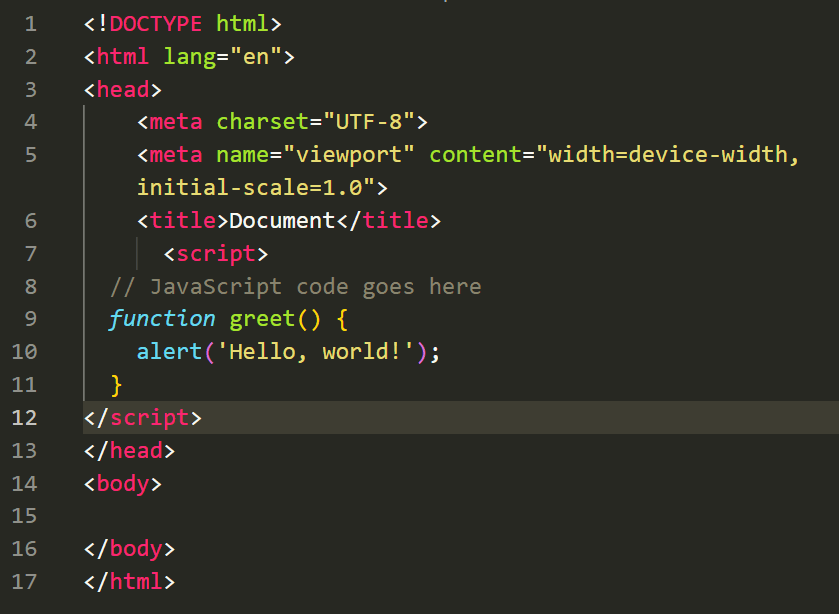
Within the<head>or<body>section of your HTML file, add the<script>tag to define the JavaScript code. There are two main ways to include JavaScript code:
- Inline JavaScript:You can write the JavaScript code directly inside the
<script>tag. For example:
- External JavaScript File:Alternatively, you can link an external JavaScript file by specifying the source file using the
srcattribute of the<script>tag. For example:
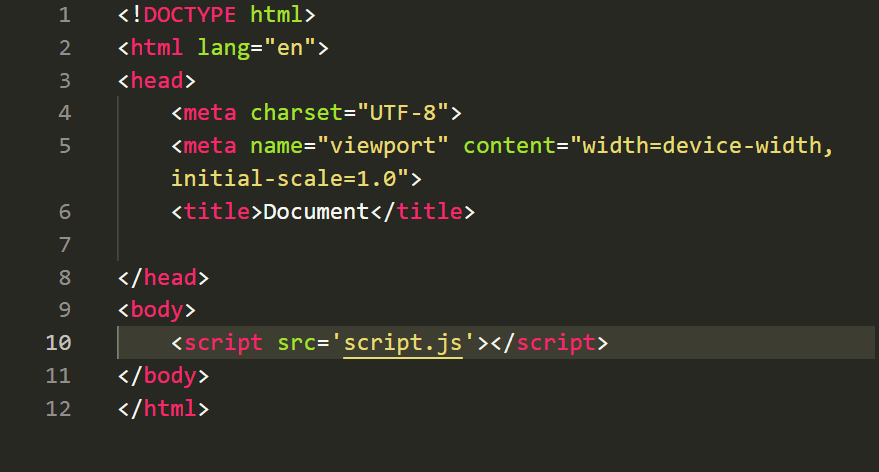
In this case, the JavaScript code is stored in a separate file named 'script.js' in the same directory as the HTML file.
Step 3: Write JavaScript Code
Within the<script>tags, write your JavaScript code. You can define functions, variables, manipulate the DOM, and add interactivity to your web page.
Step 4: Incorporate JavaScript Code in HTML Elements
You can use JavaScript to interact with HTML elements by referencing them using their IDs, classes, or tags. For example, you can use JavaScript to change the text of an HTML element:
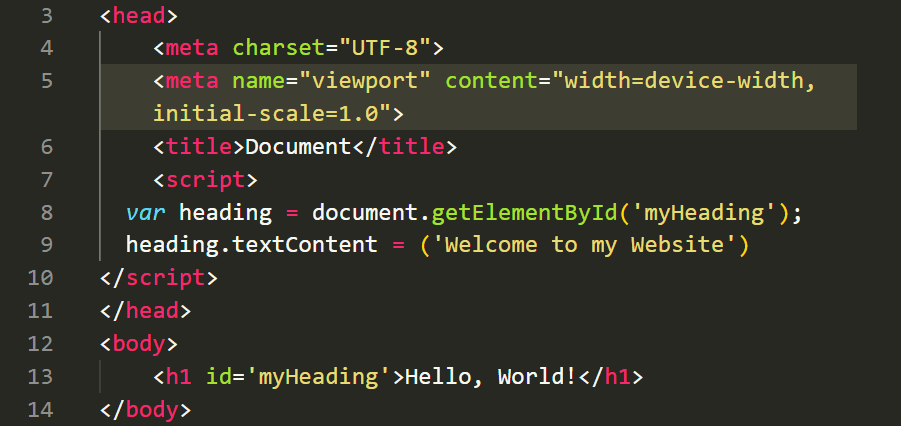
By manipulating HTML elements using JavaScript, you can create dynamic and interactive web pages.
Step 5: Save and Open the HTML File
Save the HTML file with a .html extension and open it in a web browser. The browser will interpret the JavaScript code and execute it, resulting in the expected behavior on the web page.
Remember to place the <script>tag appropriately within the HTML structure to ensure proper execution of the JavaScript code.
That's it! You have successfully added JavaScript to your HTML page and can now enhance its interactivity and functionality.
JavaScript Fundamentals
JavaScript is a versatile programming language that enables you to add interactivity and dynamic behavior to web pages. Here are some fundamental concepts of JavaScript:
Variables
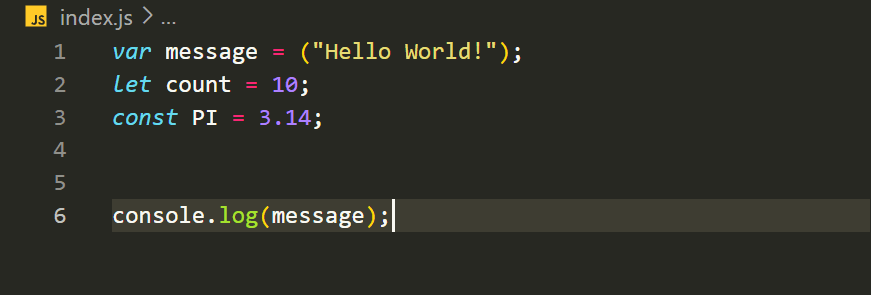
Variables in JavaScript are used to store and manipulate data. You can declare variables using thevar,let, orconstkeywords. For example:
Data Types
JavaScript supports various data types, including:
- Numbers:Used for numeric values, both integers and decimals.
- Strings:Used for text and characters enclosed in single or double quotes.
- Booleans:Representing true or false values.
- Arrays:Used to store multiple values in a single variable.
- Objects:Collections of key-value pairs.
- Null and Undefined:Representing the absence of value or an uninitialized variable.
Operators
JavaScript provides various operators for performing operations on variables and values. Some common operators include:
- Arithmetic Operators:Used for basic mathematical calculations (+, -, *, /, %).
- Assignment Operators:Used to assign values to variables (=, +=, -=, *=, /=).
- Comparison Operators: Used to compare values (==, !=, <,>, <=,>=).
- Logical Operators:Used to combine or negate logical expressions (&&, ||, !).
Control Flow
JavaScript allows you to control the flow of execution using conditional statements (if/else, switch) and loops (for, while, do-while). These control flow structures help you make decisions and repeat actions based on certain conditions.
Functions
Functions in JavaScript are reusable blocks of code that perform specific tasks. You can define functions and call them to execute their code. Functions can take parameters and return values. For example:
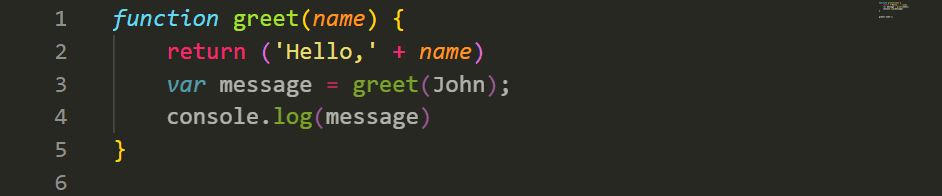
DOM Manipulation
The Document Object Model (DOM) allows JavaScript to interact with HTML elements on a web page. You can access, modify, and manipulate HTML elements using JavaScript to create dynamic and interactive web experiences.
Events
JavaScript can respond to user actions and events on a web page. You can attach event handlers to HTML elements to trigger specific JavaScript code when events occur, such as button clicks, form submissions, or mouse movements.
These are just some of the fundamental concepts of JavaScript. By understanding and applying these concepts, you can begin to build interactive and engaging web applications.
JavaScript Data Types
JavaScript supports various data types that allow you to work with different kinds of values. Here are the commonly used data types in JavaScript:
1. Number
TheNumberdata type represents numeric values. It can store both integers and floating-point numbers. For example:

2. String
TheStringdata type represents textual data. It is used to store sequences of characters, enclosed in single or double quotes. For example:

3. Boolean
TheBooleandata type represents logical values:trueorfalse. It is often used in conditional statements and logical operations. For example:

4. Array
TheArraydata type is used to store multiple values in a single variable. It is represented by square brackets and can hold values of different types. For example:
5. Object
TheObjectdata type allows you to create custom data structures by grouping related data and functionality together. It is represented by curly braces and consists of key-value pairs. For example:

6. Null and Undefined
Thenullandundefineddata types represent the absence of value or the absence of an assigned value, respectively.nullis used when you want to explicitly indicate that a variable has no value, whileundefinedis the default value for uninitialized variables. For example:
var data = null;var value;These are the fundamental data types in JavaScript. Understanding these data types is crucial for working with variables, manipulating data, and performing operations in JavaScript.
Variables and Operators in JavaScript
In JavaScript, variables are used to store and manipulate data. Operators, on the other hand, are used to perform various operations on data. Let's explore variables and operators in JavaScript:
Variables
Variables are containers for storing data values. In JavaScript, you can declare variables using thevar,let, orconstkeywords. Here's an example:
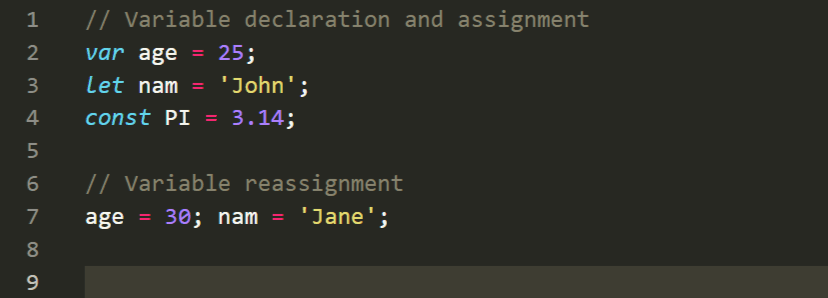
In the above example, we declare variablesage,name, andPIand assign values to them. Thevarkeyword allows variable reassignment, whileletandconstprovide block-scoping and prevent reassignment, respectively.
Operators
JavaScript supports various operators for performing operations on data. Here are some commonly used operators:
Arithmetic Operators
Arithmetic operators are used to perform mathematical calculations. Examples include:
+(addition)-(subtraction)*(multiplication)/(division)%(modulus)
Assignment Operators
Assignment operators are used to assign values to variables. Examples include:
=(simple assignment)+=(addition assignment)-=(subtraction assignment)*=(multiplication assignment)/=(division assignment)
Comparison Operators
Comparison operators are used to compare values. They returntrueorfalsebased on the comparison result. Examples include:
==(equal to)!=(not equal to)>(greater than)<(less than)>=(greater than or equal to)<=(less than or equal to)
Logical Operators
Logical operators are used to combine and manipulate logical values. Examples include:
&&(logical AND)||(logical OR)!(logical NOT)
These are just a few examples of the operators available in JavaScript. They allow you to perform operations, make decisions, and manipulate data in your JavaScript code.
Functions and Control Structures in JavaScript
In JavaScript, functions and control structures are used to control the flow of execution and perform repetitive tasks. Let's explore some commonly used control structures:
Functions
Functions in JavaScript allow you to encapsulate a block of code and execute it whenever needed. They can take input parameters, perform operations, and return a value. Here's an example of defining and calling a function:
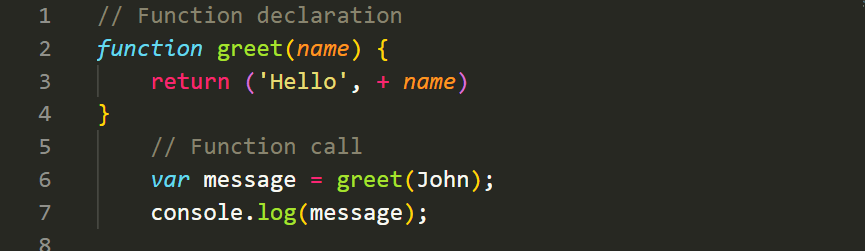
In the above example, we define a function calledgreetthat takes anameparameter and returns a greeting message. We then call the function and store the returned value in themessagevariable.
Control Structures
Control structures in JavaScript allow you to control the flow of execution based on certain conditions or perform repetitive tasks. Here are some commonly used control structures:
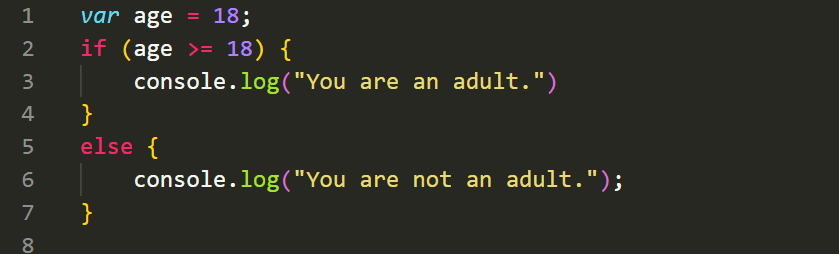
If-Else Statement
The if-else statement allows you to execute different blocks of code based on a specified condition. Here's an example:
Switch-Case Statement
The switch-case statement allows you to perform different actions based on different cases. It is often used when you have multiple conditions to check. Here's an example:
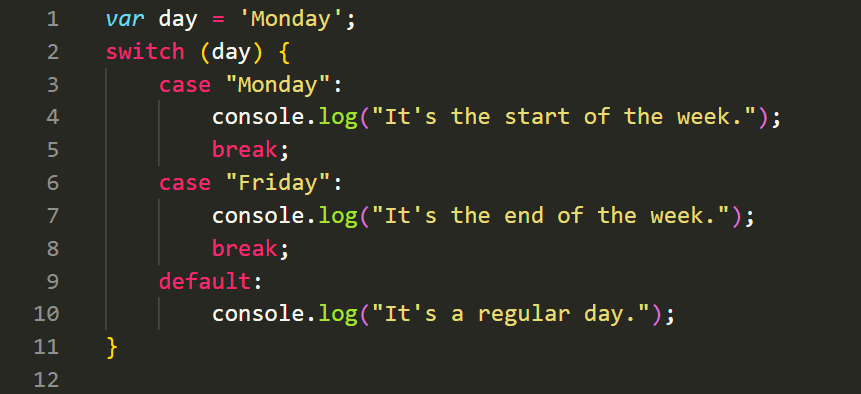
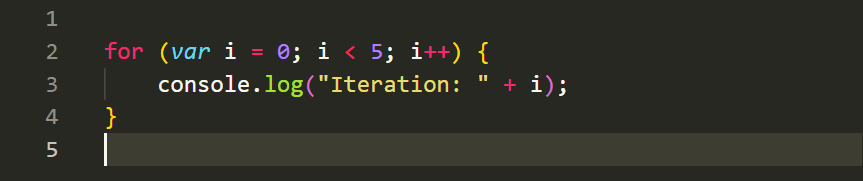
For Loop
The for loop is used to execute a block of code a specified number of times. It typically includes an initialization, a condition, and an increment/decrement. Here's an example:
While Loop
The while loop is used to repeatedly execute a block of code as long as a specified condition is true. Here's an example:

Do-While Loop
The do-while loop is similar to the while loop, but it guarantees that the code block is executed at least once, even if the condition is initially false. Here's an example:
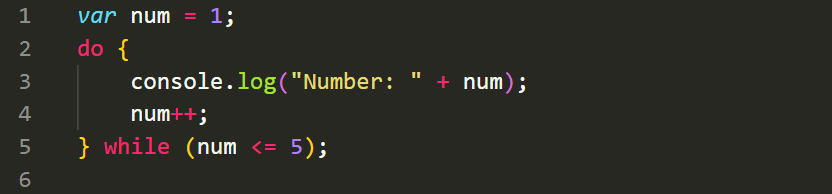
These are some of the fundamental control structures in JavaScript that allow you to perform conditional checks and repetitive tasks in your code.
Object-Based Programming with JavaScript and Event Handling
JavaScript is an object-based programming language, which means it revolves around objects and their interactions. Objects in JavaScript are collections of properties and methods that represent entities or concepts. Let's explore object-based programming and event handling in JavaScript:
Object-Based Programming
In JavaScript, you can create objects using object literals or constructor functions. Object literals allow you to define an object and its properties and methods directly. Here's an example:
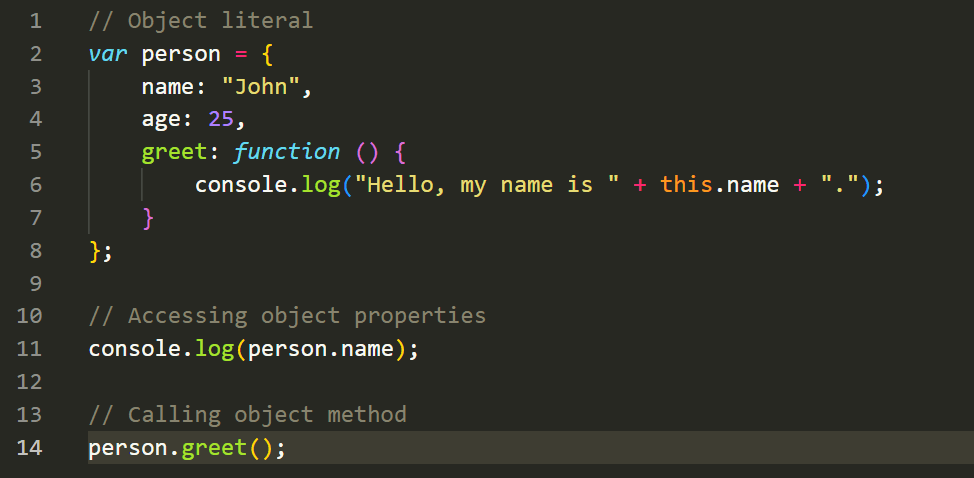
In the above example, we create an object calledpersonusing an object literal. It has properties likenameandage, as well as a method calledgreetthat logs a greeting message using thenameproperty.
Event Handling
Event handling is a crucial aspect of web development that allows you to respond to user actions or system events. In JavaScript, you can handle events using event listeners. Here's an example of handling a button click event:
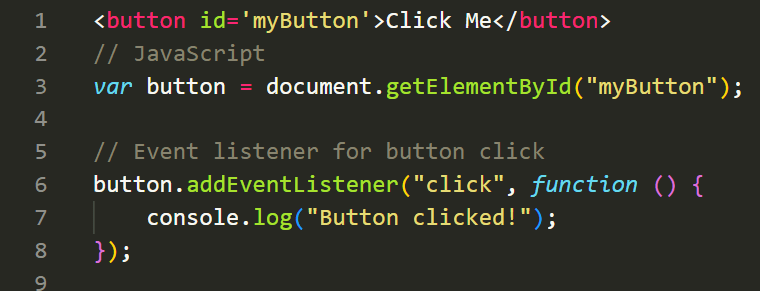
In the above example, we retrieve a reference to the button element using its ID. We then attach an event listener to the button for theclickevent. When the button is clicked, the associated callback function is executed, which logs a message to the console.
Event handling allows you to make your web pages interactive and responsive by executing specific actions based on user interactions or system events.
Image, Event, and Form Objects in JavaScript
JavaScript provides various built-in objects that allow you to work with different aspects of web development, including handling images, events, and forms. Let's explore these objects:
Image Object
The Image object in JavaScript represents an HTML<img>element. It allows you to load and manipulate images dynamically on your web page. Here's an example:
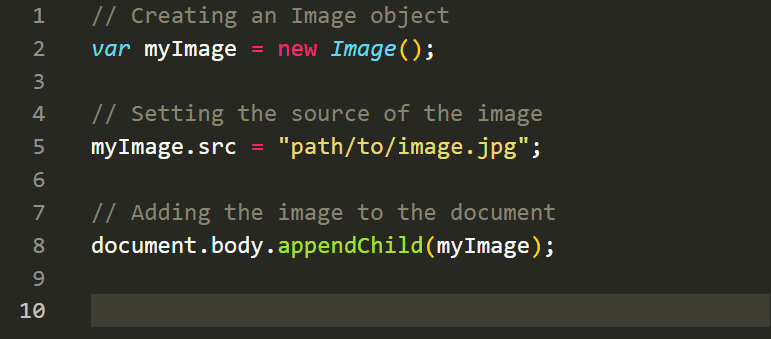
In the above example, we create an Image object using thenew Image()constructor. We set the source of the image using thesrcproperty and then append the image to the document usingappendChild().
Event Object
The Event object represents an event that occurs in the browser, such as a mouse click, keyboard input, or form submission. It provides information and methods related to the event. Here's an example of event handling:
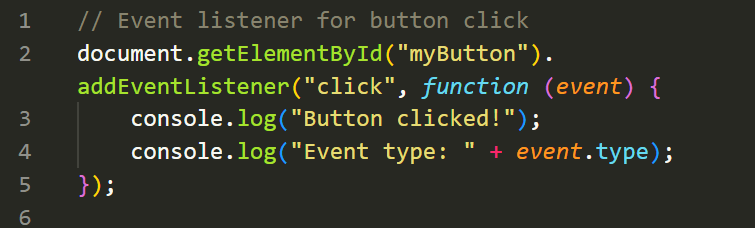
In the above example, we attach an event listener to a button's click event. The associated callback function receives the Event object as a parameter, which allows us to access information about the event. In this case, we log the event type, which will be 'click'.
Form Object
The Form object represents an HTML<form>element and provides methods and properties to work with form controls and perform form-related operations. Here's an example:
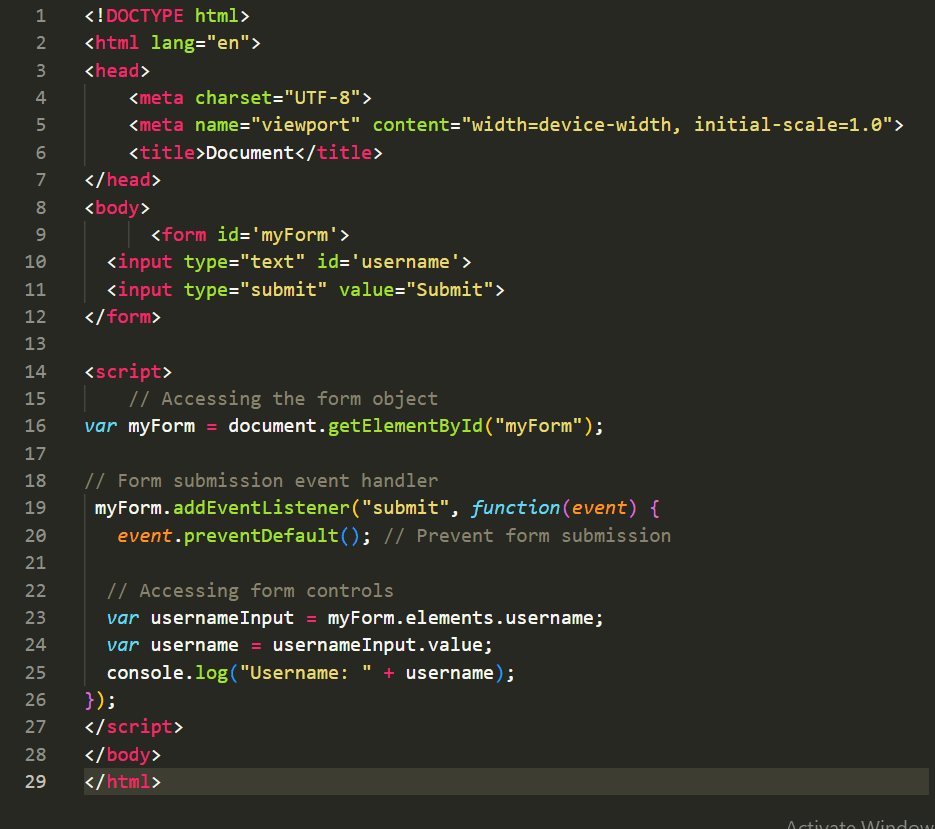
In the above example, we retrieve a reference to the form element using its ID. We attach an event listener to the form's submit event and prevent the default form submission using . We access the form controls using the
elementsproperty and retrieve the value of the username input field.
These objects - Image, Event, and Form - provide powerful capabilities to work with images, handle events, and manipulate form data in JavaScript, allowing you to create interactive and dynamic web applications.
Form Validation and jQuery
Form validation is an essential part of web development to ensure that user input meets certain criteria or constraints. JavaScript can be used to perform form validation, but jQuery, a popular JavaScript library, provides a simplified and efficient way to handle form validation tasks. Let's explore form validation and how jQuery can be used for this purpose:
Form Validation with JavaScript
Form validation with JavaScript involves writing custom JavaScript code to check the form input and display appropriate error messages if the input is invalid. Here's an example of form validation using JavaScript:
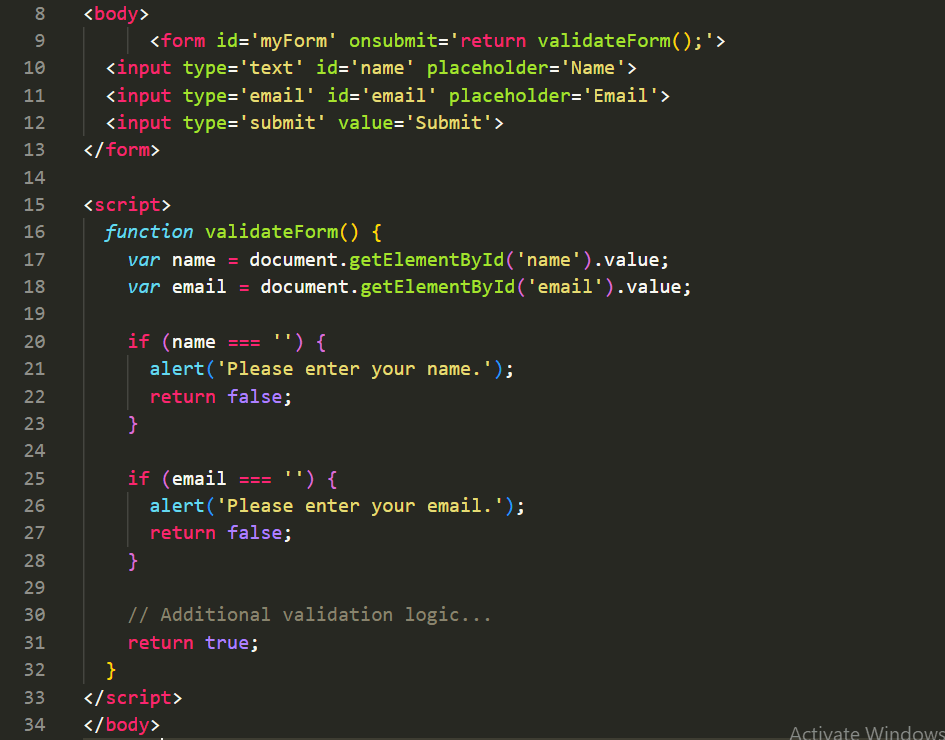
In the above example, the form has anonsubmitattribute that calls thevalidateForm()function when the form is submitted. The function retrieves the values of the name and email fields and performs validation checks. If any validation check fails, an alert is displayed, and the function returnsfalseto prevent form submission.
Form Validation with jQuery
jQuery simplifies form validation by providing ready-to-use methods and functions. It allows you to select form elements easily and apply validation rules using its built-in validation plugin. Here's an example of form validation using jQuery:
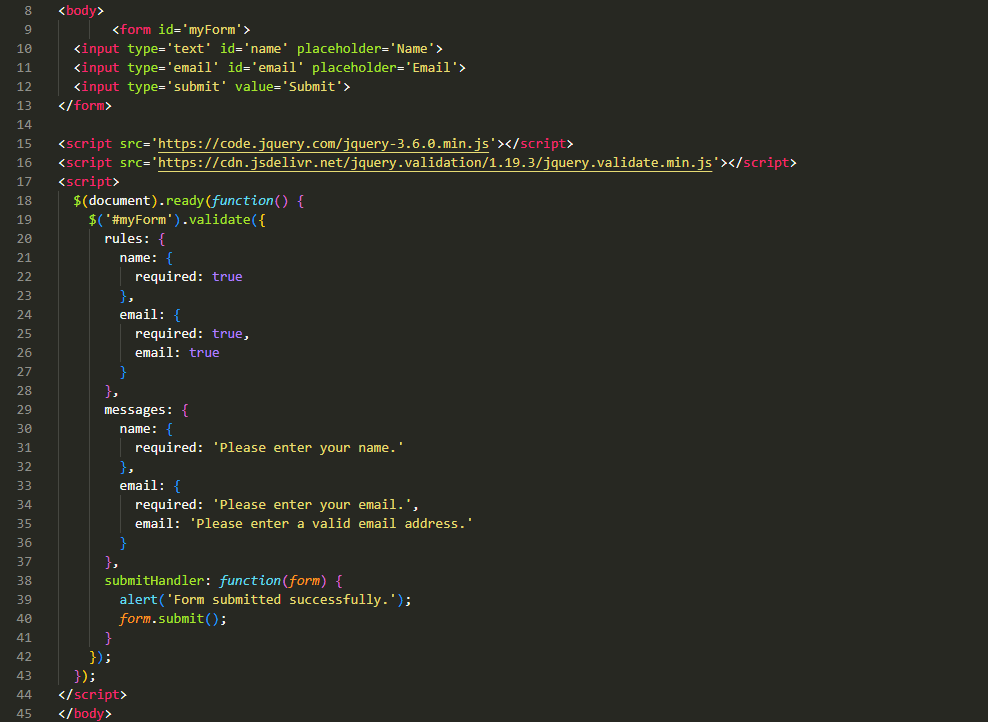
In the above example, we include the jQuery library and the jQuery Validation plugin using their respective script tags. We use thevalidate()method to apply form validation rules. Therulesobject specifies the validation rules for each form field, while themessagesobject defines custom error messages. ThesubmitHandlerfunction is called when the form is submitted successfully, allowing you to perform additional actions, such as displaying a success message or submitting the form.
Using jQuery for form validation reduces the amount of custom JavaScript code needed and provides a more concise and standardized approach.
Operators in PHP
Arithmetic Operators:
- Addition (+): Adds two operands.
- Subtraction (-): Subtracts the second operand from the first operand.
- Multiplication (*): Multiplies two operands.
- Division (/): Divides the first operand by the second operand.
- Modulus (%): Returns the remainder of the division operation.
Assignment Operators:
- Assignment (=): Assigns a value to a variable.
- Addition assignment (+=): Adds the right operand to the left operand and assigns the result to the left operand.
- Subtraction assignment (-=): Subtracts the right operand from the left operand and assigns the result to the left operand.
- Multiplication assignment (*=): Multiplies the right operand with the left operand and assigns the result to the left operand.
- Division assignment (/=): Divides the left operand by the right operand and assigns the result to the left operand.
Comparison Operators:
- Equal to (==): Checks if two operands are equal.
- Not equal to (!=): Checks if two operands are not equal.
- Identical (===): Checks if two operands are equal and of the same type.
- Not identical (!==): Checks if two operands are not equal or not of the same type.
- Greater than (>): Checks if the left operand is greater than the right operand.
Logical Operators:
- And (&&): Returns true if both operands are true.
- Or (||): Returns true if either of the operands is true.
- Not (!): Returns the negation of the operand.
These are just a few examples of operators in PHP. There are more operators available in PHP for different purposes, such as bitwise operators, increment/decrement operators, and ternary operators. Operators are essential for performing various operations and comparisons in PHP programming.
Variable Manipulation in PHP
In PHP, variables are used to store and manipulate data. Variable manipulation involves performing operations on variables to modify their values, concatenate strings, convert data types, and more. Here are some common variable manipulation techniques in PHP:
1. Assignment:
Assigning a value to a variable is done using the assignment operator (=). For example:
2. Concatenation:
Concatenation is the process of combining strings. In PHP, the concatenation operator (.) is used. For example:
3. Variable Interpolation:
Variable interpolation allows variables to be directly embedded within double-quoted strings. For example:
4. Type Conversion:
PHP automatically converts data types as needed, but explicit type conversion can also be performed using typecasting. For example:
5. Increment and Decrement:
PHP provides shorthand operators for incrementing and decrementing variables. For example:
6. Variable Swapping:
Variable values can be swapped using a temporary variable or by leveraging the list() function. For example:
These are some of the common techniques for manipulating variables in PHP. Understanding and utilizing these techniques will help you effectively work with data and perform various operations in PHP programming.
Chapter 4: Programming in C
Functions in C
In the C programming language, functions are used to encapsulate a set of statements that perform a specific task. Functions provide modularity and code reusability by allowing you to divide your program into smaller, manageable pieces. Here's an overview of functions in C:
Function Declaration:
In C, a function must be declared before it is used. The declaration specifies the function's return type, name, and any parameters it accepts. For example:
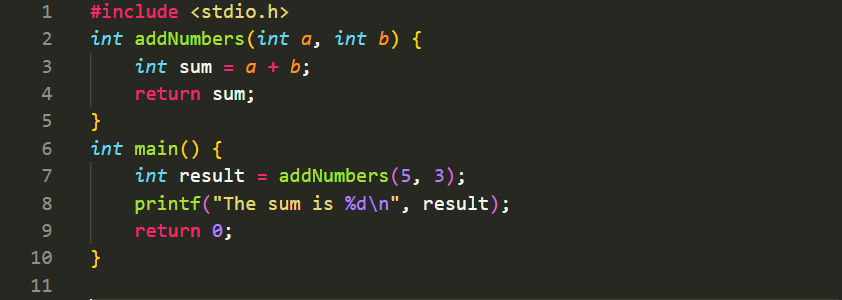
Function Definition:
The function definition contains the actual implementation of the function. It includes the function's return type, name, parameter list, and the statements that define its behavior. For example:
Function Call:
To use a function in C, you need to call it by its name and provide the necessary arguments. The function call may also assign the return value to a variable or use it directly. For example:
Function Return Type:
A function in C can have a return type, which indicates the type of value the function will return after execution. It can be a built-in type or a user-defined type. If a function does not return any value, its return type is declared asvoid. For example:

Function Parameters:
Parameters are variables declared in the function declaration and definition that receive values from the calling code. Functions can have zero or more parameters, and each parameter has a type and a name. For example:
Function Prototypes:
A function prototype declares the function's signature (return type, name, and parameter types) without providing the function definition. It allows you to use a function before defining it. For example:
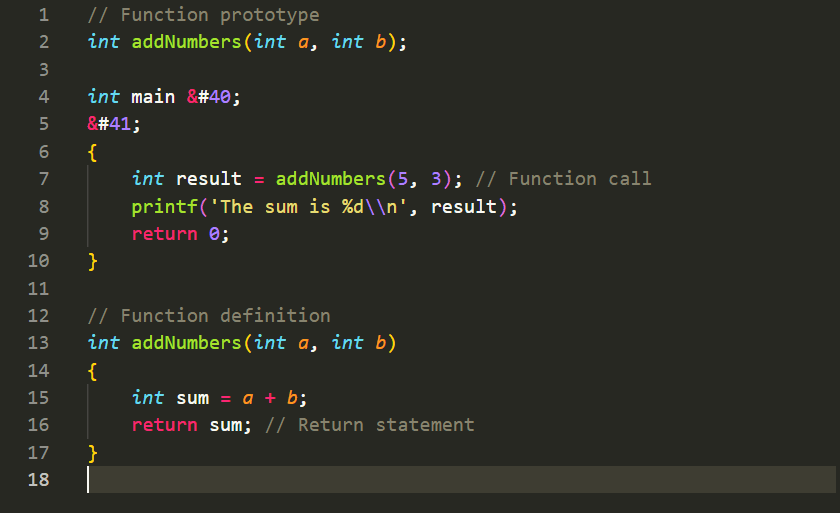
These are some fundamental concepts related to functions in the C programming language. Functions play a vital role in structuring and organizing code, making it easier to develop and maintain complex programs.
Library Functions and User-Defined Functions in C
Library Functions:
Library functions, also known as built-in functions, are pre-defined functions provided by the C standard library or other libraries. These functions are already implemented and available for use in C programs without the need for additional coding. Library functions offer a wide range of functionality, such as performing mathematical operations, manipulating strings, input/output operations, memory management, and more. Examples of library functions in C include . Library functions help simplify programming tasks and provide efficient solutions for common operations.
User-Defined Functions:
User-defined functions are functions created by the programmer to perform specific tasks based on their requirements. These functions are implemented and customized by the user according to the logic and functionality needed in the program. User-defined functions can be declared and defined in the C program, providing a modular and structured approach to programming. By encapsulating specific functionality within user-defined functions, the main program can be more readable, maintainable, and easier to debug. User-defined functions can be created to perform repetitive tasks, complex calculations, or any specific functionality not provided by the built-in library functions.
Advantages of Library Functions:
- Efficiency:Library functions are usually highly optimized and provide efficient implementations for common tasks, resulting in faster and more efficient code execution.
- Reliability:Library functions are extensively tested and widely used, making them reliable and less prone to errors or bugs.
- Code Reusability:Library functions can be used in multiple programs, promoting code reusability and saving development time.
- Standardization:Library functions follow established standards, ensuring consistency and compatibility across different platforms and environments.
Advantages of User-Defined Functions:
- Modularity:User-defined functions promote modular programming by breaking down the code into smaller, manageable, and reusable components.
- Code Organization:Functions allow better organization and structuring of code, improving readability, maintainability, and ease of understanding.
- Abstraction:User-defined functions abstract complex operations into simpler, self-contained units, making the main program more concise and focused on high-level logic.
- Customization:User-defined functions can be tailored to specific requirements, enabling developers to implement custom functionality and solve unique problems.
Combining the use of library functions and user-defined functions provides a powerful approach to C programming. Library functions offer a wide range of functionality, while user-defined functions provide flexibility, code organization, and customization to meet specific programming needs.
Function Definition, Prototype, Call, and Return Statements in C
In C programming, functions are defined, prototyped, called, and include return statements to control program flow and perform specific tasks. Here's an explanation of these concepts:
Function Definition:
A function definition contains the actual implementation of the function. It includes the function's return type, name, parameter list, and the statements that define its behavior. The syntax for a function definition is as follows:
Function Prototype:
A function prototype declares the function's signature (return type, name, and parameter types) without providing the function definition. It serves as a forward declaration of the function, allowing the program to know about the function before using it. The syntax for a function prototype is as follows:
Function Call:
To use a function in C, you need to call it by its name and provide the necessary arguments. The function call statement invokes the function and executes the statements inside it. The syntax for a function call is as follows:
Return Statement:
The return statement is used to terminate a function and return a value to the calling code. It specifies the value to be returned and control is transferred back to the calling code. The syntax for a return statement is as follows:
Here's an example that demonstrates these concepts:
In this example, the functionaddNumbers()is defined, prototyped, called, and includes a return statement. The function prototype informs the compiler about the function's existence before themain()function is called. The function call statement inmain()invokes theaddNumbers()function and passes the arguments5and3. Inside theaddNumbers()function, the sum of the two numbers is calculated, and the result is returned using the return statement. The returned value is then assigned to the variableresultin themain()function and displayed usingprintf().
Understanding and utilizing these concepts enables you to create and use functions effectively in your C programs, providing modularity, reusability, and control over program execution.
Accessing a function by passing values:
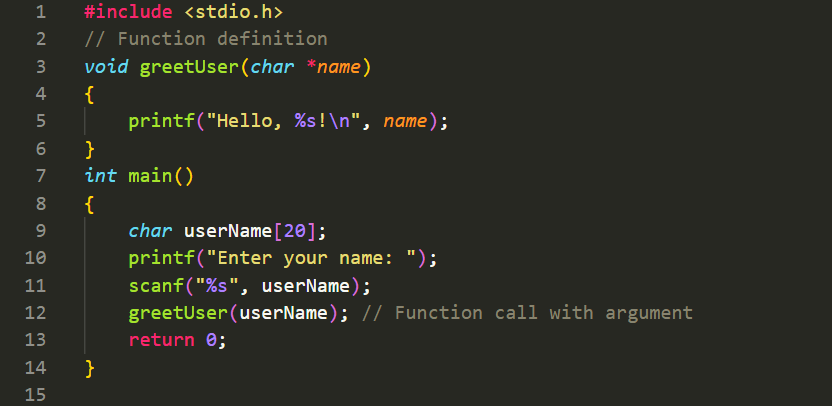
Concept of Storage: Automatic and External
In C programming, storage refers to the memory space allocated to variables and functions during program execution. There are two primary storage classes in C: automatic and external. Let's explore these concepts:
Automatic Storage:
Automatic storage refers to the memory allocated for variables defined within a function or block. These variables have automatic storage duration, meaning they are created when the block is entered and destroyed when the block is exited. Automatic variables are typically declared using the \`auto\` keyword, although it is optional since it is the default storage class. For example:
The automatic variable \`num\` is allocated memory when \`myFunction()\` is called and released when the function returns or exits the block.
External Storage:
External storage refers to the memory allocated for variables declared outside of any function or block. These variables have external storage duration, meaning they exist throughout the entire program execution. External variables are typically declared using the \`extern\` keyword, indicating that the variable is defined elsewhere. For example:
In this example, the \`globalVar\` variable is declared as an external variable using the \`extern\` keyword. It is defined in another source file or library and can be accessed by multiple functions within the program.
It's worth noting that the \`extern\` keyword is used for declaring external variables, while the actual definition is provided outside any function or block.
The concept of storage in C provides flexibility in managing memory for variables and functions. Automatic storage is suitable for temporary variables within a limited scope, while external storage allows for sharing variables across different functions or files.
Concept of Recursion: Factorial and Fibonacci Problems
Recursion is a programming technique where a function calls itself repeatedly to solve a problem by breaking it down into smaller subproblems. It involves defining a base case that terminates the recursive process and one or more recursive cases that reduce the problem towards the base case. Let's explore the concept of recursion with two classic examples: factorial and Fibonacci sequence.
Factorial:
The factorial of a non-negative integer n, denoted as n!, is the product of all positive integers from 1 to n. The factorial function can be defined recursively as follows:
In the factorial function, the base case is when n is 0 or 1, where the function returns 1. In the recursive case, the function multiplies n with the factorial of (n-1) until the base case is reached. This recursion continues until the desired factorial value is computed.
Fibonacci Sequence:
The Fibonacci sequence is a series of numbers in which each number (after the first two) is the sum of the two preceding ones. The Fibonacci sequence can be defined recursively as follows:
In the Fibonacci function, the base cases are when n is 0 and 1, where the function returns 0 and 1, respectively. In the recursive case, the function calculates the Fibonacci of n by summing the Fibonacci of (n-1) and Fibonacci of (n-2) until the base cases are reached.
Recursion provides an elegant way to solve problems that can be divided into smaller subproblems. However, it's important to handle base cases correctly to prevent infinite recursion. Understanding the concept of recursion helps in solving complex problems by breaking them down into simpler, recursive steps.
Structure: Definition, Declaration, Initialization, and Size
In C programming, a structure is a user-defined data type that allows you to group related data items together under a single name. It provides a way to create complex data structures by combining different data types into a single unit. Let's explore the concepts of structure definition, declaration, initialization, and size:
Structure Definition:
A structure is defined using the \`struct\` keyword followed by the structure name and a list of member variables enclosed in curly braces. The structure definition does not allocate memory for the structure but provides a blueprint for creating instances of the structure. For example:
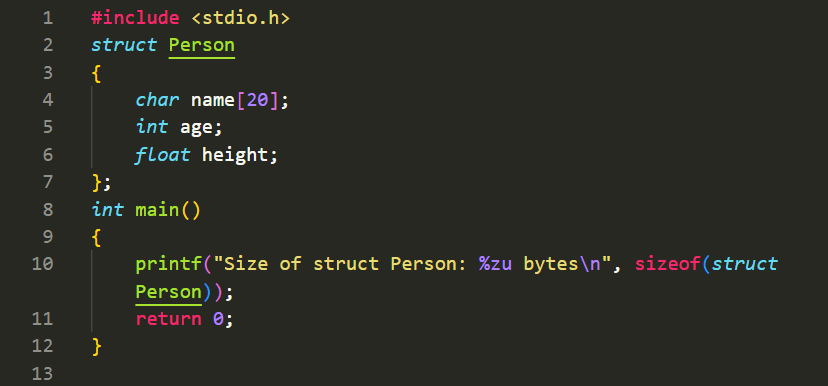
In this example, we define a structure named \`Person\` with three member variables: \`name\` of type \`char\` array, \`age\` of type \`int\`, and \`height\` of type \`float\`. The structure definition specifies the layout and data types of the structure members.
Structure Declaration:
Structure declaration creates variables of the structure type. To declare a structure variable, you use the structure name followed by the variable name. For example:
In this case, we declare two variables of type \`Person\` named \`p1\` and \`p2\`. Each variable will have its own memory space to hold the structure members.
Structure Initialization:
Structure variables can be initialized during declaration or later using the assignment operator (\`=\`). To initialize a structure during declaration, you enclose the initial values within curly braces and provide them in the same order as the structure members. For example:
In this case, we initialize the \`p1\` structure variable with the values 'John Doe' for \`name\`, 25 for \`age\`, and 1.75 for \`height\`.
Structure Size:
The size of a structure is determined by the combined size of its members, with potential padding added for alignment purposes. The \`sizeof\` operator in C can be used to find the size of a structure in bytes. For example:
In this example, the \`sizeof\` operator is used to determine the size of the \`Person\` structure. The result is printed using \`printf()\`. The size of a structure may vary depending on the sizes of its member variables and any padding added by the compiler for alignment.
Understanding structure definition, declaration, initialization, and size allows you to define and work with complex data structures in C, organizing related data into cohesive units.
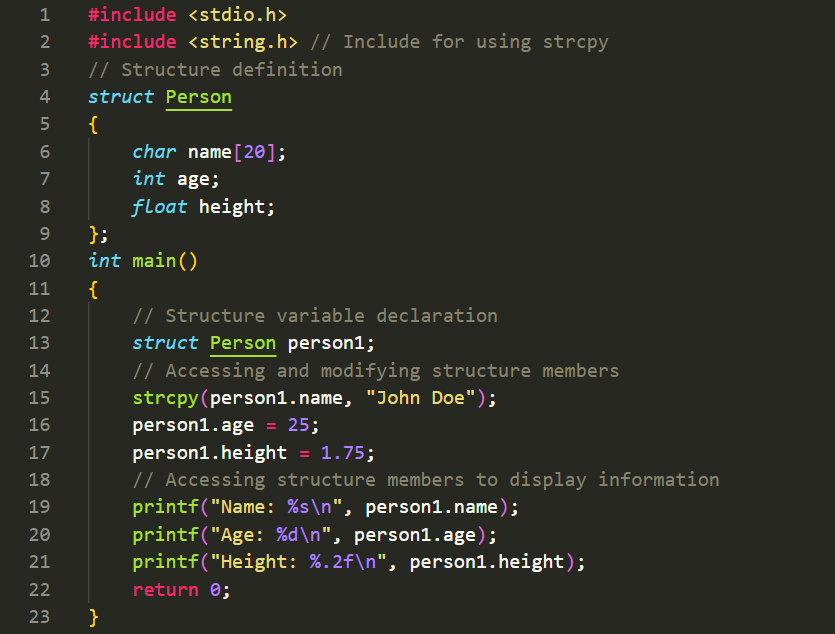
Array of Structures
In C, you can create an array of structures by combining the concept of arrays and structures. This allows you to store multiple instances of a structure in a contiguous block of memory. Each element of the array represents an individual structure. Let's see an example:
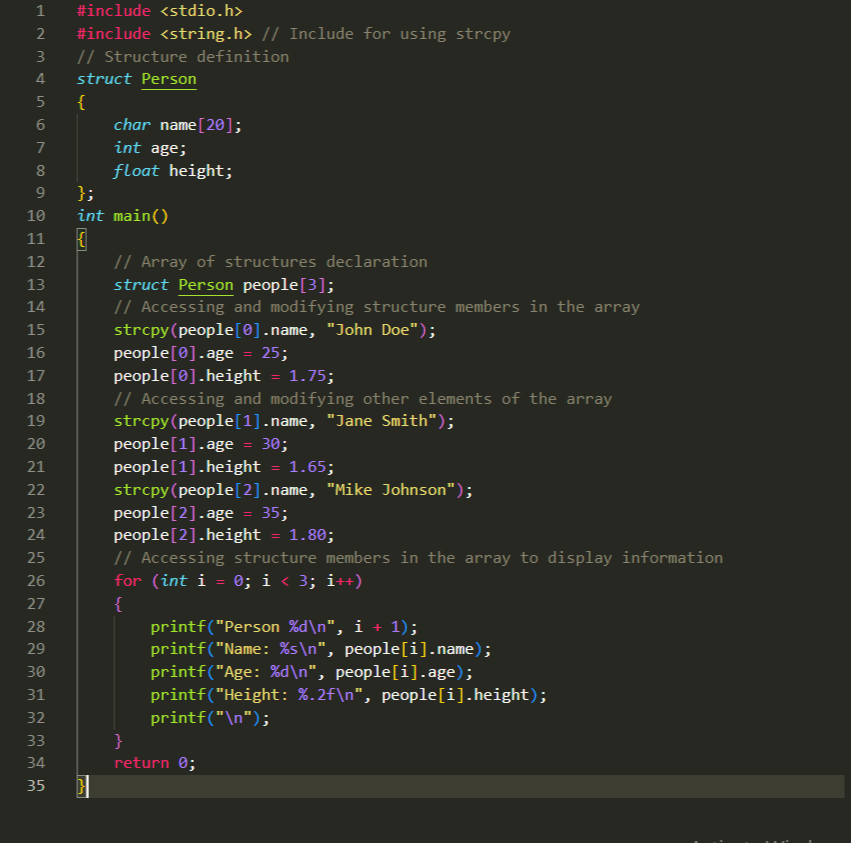
In this example, we define a structure named \`Person\` with three members: \`name\`, \`age\`, and \`height\`. Inside the \`main()\` function, we declare an array of structures named \`people\` with a size of 3. Each element of the array represents an individual \`Person\` structure.
We access and modify the members of the structures in the array using the dot operator (\`.\`). For example, \`people[0].name\` accesses the \`name\` member of the first structure in the array. Similarly, we assign values to other members of different structures in the array.
To display the information of each person in the array, we use a \`for\` loop to iterate through the array. We access the structure members using the dot operator and print their values using \`printf()\` statements.
The output of the program will display the information of each person in the array:
An array of structures allows you to work with multiple instances of a structure efficiently, storing related data in a structured manner.
Union: Definition and Declaration
In C programming, a union is a user-defined data type that allows you to store different types of data in the same memory space. Unlike structures, where each member has its own memory space, union members share the same memory location. This means that a union can hold only one value at a time.
Union Definition:
A union is defined using the \`union\` keyword followed by the union name and a list of member variables enclosed in curly braces. The members can have different data types, and they all share the same memory location. For example:
In this example, we define a union named \`Data\` with three members: \`integer\` of type \`int\`, \`floatingPoint\` of type \`float\`, and \`character\` of type \`char\`. All three members share the same memory location.
Union Declaration:
To declare a union variable, you use the union name followed by the variable name. For example:
In this case, we declare a union variable named \`value\` of type \`Data\`. The memory allocated for \`value\` can be used to store any of the members defined in the union.
After declaring a union variable, you can access the members using the dot (\`.\`) operator, similar to accessing structure members. However, remember that only one member of the union can be active at a time.
Unions are particularly useful when you want to represent different types of data using the same memory location or when you need to save memory by using a single space for multiple data types.
| Union | Structure |
|---|---|
|
|
Pointer
A pointer is a variable in C that stores the memory address of another variable. It 'points' to the location of a specific data object in memory. Pointers allow you to indirectly access and manipulate variables by referencing their memory locations rather than their values directly.
Pointers are declared by using the asterisk (*) symbol before the variable name. The type of the pointer indicates the type of the variable it points to. For example:
In this example, we declare a pointer named \`ptr\` of type \`int\`. It can store the memory address of an integer variable.
You can assign the address of a variable to a pointer by using the address-of operator (&). For example:
In this case, we assign the address of the \`num\` variable to the \`ptr\` pointer. Now, \`ptr\` points to the memory location of \`num\`.
To access the value of the variable pointed to by a pointer, you use the dereference operator (*). For example:
In this case, we assign the value stored at the memory location pointed to by \`ptr\` to the \`value\` variable.
Pointers are widely used in C programming for various purposes, including dynamic memory allocation, passing variables by reference, and working with arrays and complex data structures.
Pointer Expression and Assignment
In C programming, pointer expressions and assignments are used to manipulate and work with pointers. Let's explore how pointer expressions are formed and how assignments can be made:
Pointer Expression:
A pointer expression is an expression that involves pointers. It can be formed by using the following operators:
- Address-of Operator (&):It returns the memory address of a variable. For example, if \`num\` is an integer variable, then \`&num\` is the pointer expression representing the address of \`num\`.
- Dereference Operator (*):It is used to access the value stored at the memory address pointed to by a pointer. For example, if \`ptr\` is a pointer to an integer, then \`*ptr\` is the pointer expression representing the value at the memory location pointed to by \`ptr\`.
- Arithmetic Operators (+, -, ++, --):They can be used with pointers to perform arithmetic operations on memory addresses. For example, if \`ptr\` is a pointer to an integer, then \`ptr + 1\` is the pointer expression representing the next memory location after \`ptr\`.
Pointer Assignment:
Pointer assignment is used to assign a value or address to a pointer. There are two common types of pointer assignment:
- Assigning Address:You can assign the memory address of a variable to a pointer using the address-of operator (&). For example, \`int *ptr = #\` assigns the address of the \`num\` variable to the \`ptr\` pointer.
- Assigning Pointer:You can assign the value of one pointer to another pointer of the same type. For example, \`int *ptr2 = ptr1;\` assigns the value of \`ptr1\` to \`ptr2\`, making \`ptr2\` point to the same memory location as \`ptr1\`.
Pointer expressions and assignments are essential in C programming for tasks such as dynamic memory allocation, accessing and manipulating data through pointers, and working with complex data structures.
Call by Value and Call by Reference
In programming, 'call by value' and 'call by reference' are two different approaches for passing arguments to functions. Let's understand the differences between these two methods:
Call by Value:
In call by value, the values of the arguments are passed to the function. A copy of the values is created, and any modifications made to the parameters within the function do not affect the original values outside the function. The original variables remain unchanged.
Here's an example of a function called \`swap\` that exchanges the values of two integers:
In this case, when the \`swap\` function is called, the values of \`x\` and \`y\` are copied into the function parameters \`a\` and \`b\`. The swapping operation occurs within the function, but it does not affect the original variables \`x\` and \`y\` in the \`main\` function.
Call by Reference:
In call by reference, the memory addresses (references) of the arguments are passed to the function. Instead of working with copies, the function receives the actual memory locations of the variables. Any modifications made to the parameters within the function directly affect the original variables outside the function.
Here's an example using call by reference:
In this example, the \`swap\` function takes pointers to integers (\`int*\`) as arguments. The addresses of \`x\` and \`y\` are passed using the address-of operator (\`&\`). Within the function, the pointers are dereferenced using the asterisk (\`*\`) to access and modify the values at the memory locations.
As a result, the values of \`x\` and \`y\` in the \`main\` function are swapped because the modifications made within the \`swap\` function affect the original variables due to the use of call by reference.
Call by value is typically used when you want to keep the original values intact and avoid unintended modifications. Call by reference is useful when you want to modify the original variables within the function or pass large data structures without incurring the overhead of copying.
Data File
In computer science and programming, a data file is a collection of data that is stored and organized for efficient retrieval and manipulation. It is a structured or unstructured file that contains information in a specific format, such as text, binary, or a combination of both.
Data files are used to store various types of data, including text documents, images, audio files, videos, database records, configuration settings, and more. They serve as a persistent storage medium, allowing data to be saved and accessed even after the program or system is closed or restarted.
Data files can be categorized into different types based on their structure and format:
- Text Files:Text files store data in plain text format, where each character is represented using a specific encoding (e.g., ASCII or UTF-8). These files are human-readable and can be opened and edited using a simple text editor. Examples of text files include configuration files, log files, and source code files.
- Binary Files:Binary files store data in a binary format, which means the information is represented as a sequence of 0s and 1s. They contain non-textual data, such as images, audio, video, and compiled program files. Binary files are not easily human-readable and require specific software or applications to interpret and manipulate the data.
- Structured Files:Structured files have a specific organization or structure that allows the data to be stored and retrieved in a predefined manner. Examples include database files, spreadsheet files, XML files, and JSON files. Structured files often have a well-defined schema or format that determines how the data is organized and accessed.
- Unstructured Files:Unstructured files do not have a specific organization or format. They store data in a free-form manner without adhering to any predefined structure. Examples include multimedia files, documents, and random access files. Unstructured files require custom parsing or processing techniques to extract meaningful information from the data.
Data files are accessed and manipulated by programs using file input/output (I/O) operations. These operations allow data to be read from or written to the file, enabling data storage, retrieval, modification, and deletion. File I/O functions and libraries are available in various programming languages to facilitate working with data files.
Data files play a vital role in many applications and systems, enabling the persistent storage and management of data for different purposes, such as data analysis, information retrieval, data exchange, and archival.
Sequential File and Random File
In the context of data files, 'sequential file' and 'random file' refer to different methods of accessing and manipulating the data within a file. Let's understand the characteristics and differences between these two file access methods:
Sequential File:
A sequential file is a type of data file where the records are stored and accessed in a sequential manner, one after another, in a specific order. The records in a sequential file are typically stored consecutively in the file, and the file is processed from the beginning to the end in a linear fashion.
Sequential file access follows a specific sequence, starting from the first record and proceeding sequentially until the desired record is found or the end of the file is reached. This means that to access a specific record in a sequential file, all preceding records must be read and processed first.
Sequential file access is efficient for tasks that involve processing the entire file sequentially, such as batch processing or generating reports. However, it can be inefficient for random access or searching specific records within the file since it requires reading and processing all preceding records.
Random File:
A random file, also known as a direct access file or indexed file, allows direct access to individual records within the file without the need to process preceding records. In a random file, records are stored independently, and each record is associated with a unique identifier or key.
Random file access allows for direct retrieval and modification of specific records based on their keys. Instead of reading the entire file sequentially, the file system uses the provided key to locate and access the desired record directly.
Random file access is efficient when quick access to specific records is required, such as in database systems or applications that involve frequent searching, updating, or retrieval of specific data elements.
The choice between sequential and random file access depends on the nature of the application and the operations performed on the data. Sequential file access is suitable for tasks that involve processing data in a linear manner, while random file access is ideal for applications that require quick access to specific records without the need for sequential processing.
File Manipulation Functions
In programming, file manipulation functions are used to perform various operations on files, such as creating, opening, reading, writing, modifying, and closing files. These functions provide the necessary functionality to interact with files and manipulate their content. Here are some commonly used file manipulation functions:
- fopen:The fopen function is used to open a file. It takes two parameters: the filename (including the path) and the mode in which the file is to be opened (e.g., read, write, append). It returns a file pointer that is used to reference the opened file in subsequent operations.
- fclose:The fclose function is used to close an opened file. It takes a file pointer as a parameter and releases the associated system resources.
- fread:The fread function is used to read data from a file. It takes parameters such as the destination buffer, size of each element to be read, number of elements to be read, and the file pointer. It returns the number of elements successfully read.
- fwrite:The fwrite function is used to write data to a file. It takes parameters such as the source buffer, size of each element to be written, number of elements to be written, and the file pointer. It returns the number of elements successfully written.
- fgets:The fgets function is used to read a line from a file. It takes parameters such as the destination buffer, maximum number of characters to be read, and the file pointer. It returns the read line as a string.
- fputs:The fputs function is used to write a string to a file. It takes parameters such as the source string and the file pointer.
- fseek:The fseek function is used to set the file position indicator to a specific position within the file. It takes parameters such as the file pointer and the offset from a reference position (e.g., beginning, current, end).
- feof:The feof function is used to check the end-of-file (EOF) condition. It takes a file pointer as a parameter and returns a non-zero value if the end of the file has been reached.
- remove:The remove function is used to delete a file from the file system. It takes the filename as a parameter and removes the file if it exists.
These are just a few examples of file manipulation functions available in various programming languages. The specific functions and their usage may vary depending on the programming language and the file system being used.
Opening, Reading, Writing, and Appending Data Files
When working with data files, you typically need to perform operations such as opening the file, reading its content, writing new data, and appending data to an existing file. Let's explore how these operations are performed using file manipulation functions:
Opening a Data File:
To open a data file, you can use the fopen function. It takes two parameters: the filename (including the path) and the mode in which the file should be opened. Here are some commonly used modes:
- 'r':Opens the file for reading.
- 'w':Opens the file for writing. If the file already exists, its contents are truncated. If the file doesn't exist, a new file is created.
- 'a':Opens the file for appending. Data is written at the end of the file. If the file doesn't exist, a new file is created.
Example:
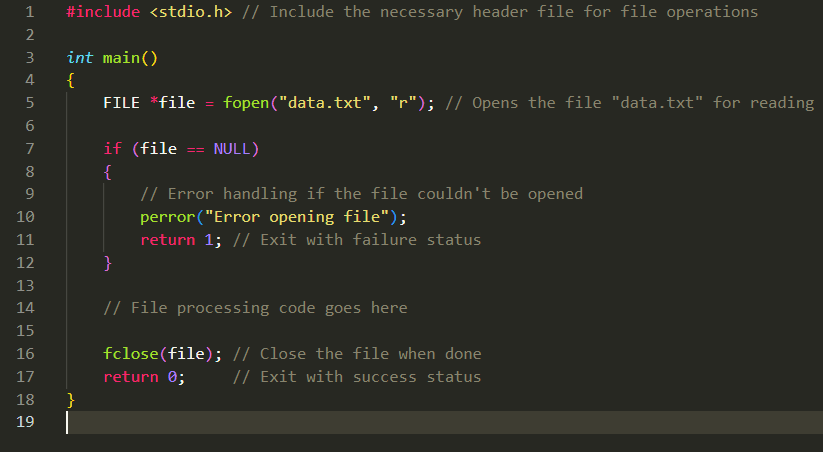
Reading from a Data File:
To read data from a file, you can use functions such as fread or fgets. The fread function reads a specified number of elements from the file, while the fgets function reads a line of text from the file.
Example:
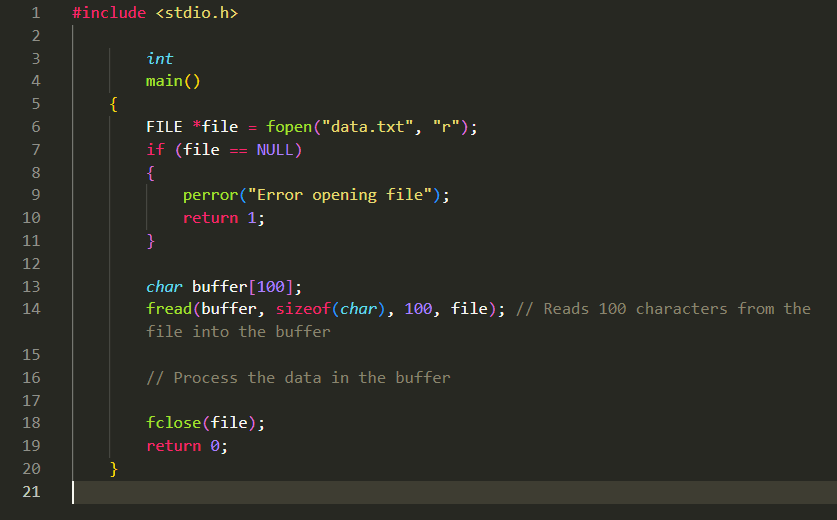
Writing to a Data File:
To write data to a file, you can use functions such as fwrite or fputs. The fwrite function writes a specified number of elements to the file, while the fputs function writes a string to the file.
Example:
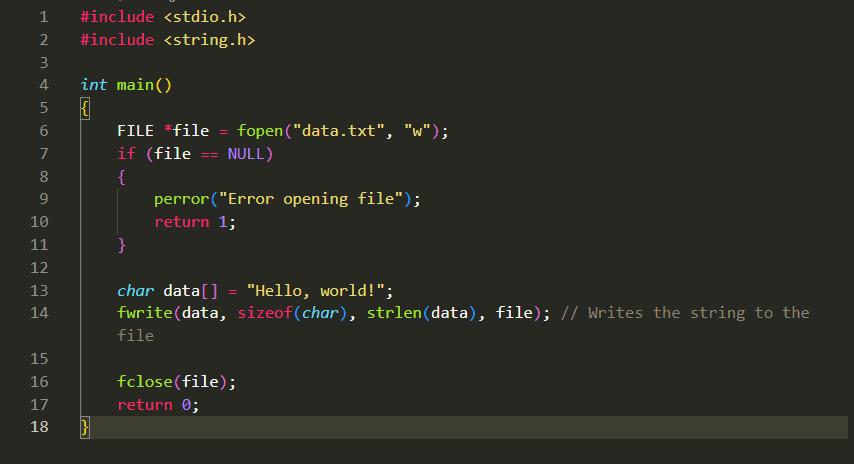
Appending to a Data File:
To append data to an existing file, you can open the file in 'a' (append) mode. Subsequent write operations will add data to the end of the file.
Example:
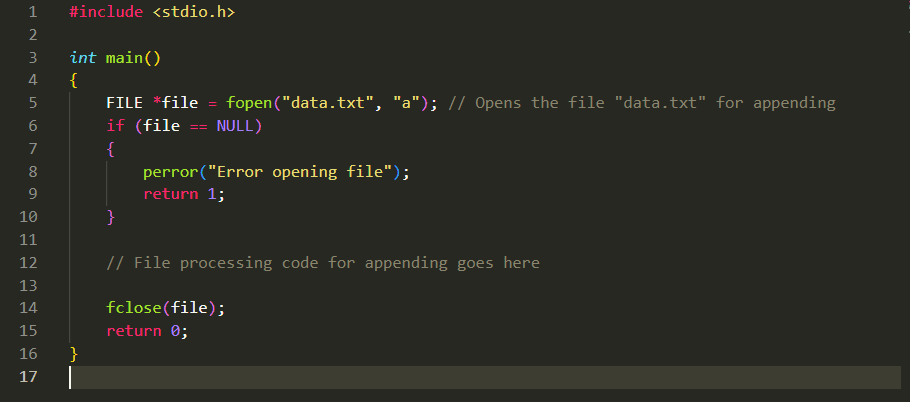
After performing the necessary operations, remember to close the file using the fclose function:

These are general examples of opening, reading, writing, and appending data files. The specific functions and their usage may vary depending on the programming language and file system being used.
Chapter 5: Object-Oriented Programming
Programming Paradigms: Procedural, Structured, and Object-Oriented
In computer programming, different paradigms represent different approaches to designing and structuring programs. Three commonly used programming paradigms are procedural, structured, and object-oriented programming (OOP). Let's explore each of these paradigms:
Procedural Programming:
In procedural programming, programs are organized around procedures or functions that contain a series of instructions to be executed in a specific order. The focus is on breaking down the program into smaller reusable functions, which are then called to perform specific tasks. Procedural programming emphasizes code reusability, modularity, and step-by-step execution of instructions.
The main characteristics of procedural programming include:
- Procedures: Programs are divided into procedures or functions.
- Global Data: Data is shared globally between procedures.
- Top-Down Design: Programs are designed by breaking down tasks into smaller subtasks.
- Procedure Calls: Procedures are called to execute specific tasks.
Structured Programming:
Structured programming builds upon procedural programming and introduces additional concepts to enhance code organization and maintainability. It emphasizes the use of control structures such as sequences, loops, and conditionals to improve program readability and avoid unstructured jumps or 'goto' statements.
The main characteristics of structured programming include:
- Control Structures: Programs use structured control flow constructs.
- Single Entry and Single Exit: Each control structure has a single entry point and a single exit point.
- Modularity: Programs are divided into small, manageable modules.
- Code Reusability: Modules can be reused in different parts of the program.
Object-Oriented Programming (OOP):
Object-oriented programming (OOP) is a programming paradigm that focuses on modeling programs around objects, which are instances of classes. Objects encapsulate data and behavior, and interactions between objects occur through method calls and message passing. OOP promotes code reusability, encapsulation, and the concept of inheritance, allowing for the creation of complex and scalable software systems.
The main characteristics of object-oriented programming include:
- Classes and Objects: Programs are structured around classes that define objects.
- Encapsulation: Data and methods are encapsulated within objects.
- Inheritance: Classes can inherit properties and behavior from other classes.
- Polymorphism: Objects can take on different forms or respond differently to the same message.
Each programming paradigm has its own strengths and weaknesses, and the choice of paradigm depends on factors such as the nature of the problem, the development team's familiarity, and the requirements of the project.
Features of Object-Oriented Programming (OOP)
Object-oriented programming (OOP) is a programming paradigm that provides a set of features and principles for organizing and structuring software. These features enable developers to create modular, reusable, and maintainable code. Here are some key features of OOP:
- 1. Encapsulation:Encapsulation is the principle of bundling data and methods together into a single unit called an object. Objects encapsulate data (attributes) and the operations (methods) that can be performed on that data. Encapsulation provides data hiding and protects the internal state of an object, allowing controlled access through well-defined interfaces.
- 2. Inheritance:Inheritance is a mechanism that allows a class to inherit properties and behavior from another class, referred to as the base or parent class. The derived or child class inherits the attributes and methods of the parent class and can extend or modify them as needed. Inheritance promotes code reuse, modularity, and the creation of hierarchical relationships between classes.
- 3. Polymorphism:Polymorphism allows objects of different classes to be treated as objects of a common parent class. It enables objects to respond differently to the same message or method call, based on their specific implementation. Polymorphism enhances code flexibility, extensibility, and modifiability.
- 4. Abstraction:Abstraction is the process of simplifying complex systems by breaking them down into manageable and understandable components. In OOP, abstraction focuses on defining the essential characteristics and behavior of an object while hiding unnecessary details. Abstract classes and interfaces provide blueprints for creating objects and specifying their common properties and methods.
- 5. Modularity:Modularity is the concept of dividing a program into independent and self-contained modules or classes. Each module or class represents a specific functionality or component of the overall system. Modularity enhances code organization, reusability, and maintainability, as modules can be developed, tested, and modified independently.
These features of OOP collectively provide a powerful and flexible framework for software development. They promote code reusability, maintainability, and scalability, making it easier to manage and evolve complex software systems.
Advantages of Object-Oriented Programming (OOP)
Object-oriented programming (OOP) offers numerous advantages that contribute to the development of efficient, modular, and reusable software. Here are some key advantages of OOP:
- 1. Modularity and Reusability:OOP promotes modularity by encapsulating data and behavior into objects. Objects can be reused in different parts of a program or in different projects, leading to improved code reusability and faster development cycles. This modular approach simplifies maintenance and updates, as changes made to one object do not affect other objects as long as the interface remains the same.
- 2. Code Organization and Maintainability:OOP emphasizes the use of classes and objects, which provide a clear structure and organization to the codebase. This makes it easier to understand, maintain, and update the code. Each object encapsulates its own data and behavior, making it easier to locate and modify specific functionality without affecting other parts of the program.
- 3. Code Reusability:OOP facilitates code reusability through concepts such as inheritance and polymorphism. Inheritance allows new classes to inherit properties and behaviors from existing classes, reducing the need to rewrite code. Polymorphism enables objects of different classes to be treated as objects of a common parent class, promoting interchangeable use and flexibility.
- 4. Flexibility and Extensibility:OOP provides a flexible and extensible framework for software development. New classes and objects can be easily added to existing code without affecting the functionality of other code modules. This allows for easier maintenance, updates, and the addition of new features to the software over time.
- 5. Simplicity and Readability:OOP promotes a more intuitive and natural way of representing real-world objects and concepts in code. The use of classes, objects, and their relationships makes the code easier to understand and read, reducing complexity and enhancing developer productivity. OOP also encourages the use of descriptive and self-explanatory names for classes, methods, and attributes, further improving code readability.
These advantages make OOP a popular and widely adopted paradigm in software development. OOP helps in building robust, maintainable, and scalable applications by leveraging concepts such as modularity, code reusability, and encapsulation.
Applications of Object-Oriented Programming (OOP)
Object-oriented programming (OOP) is a versatile paradigm that finds applications in various domains of software development. Here are some common areas where OOP is extensively used:
- 1. Software Development:OOP is widely used in general software development to create applications, systems, and libraries. The modular and reusable nature of OOP allows for efficient development, maintenance, and scalability of software projects. OOP languages like Java, C++, and Python are commonly used for building desktop applications, web applications, mobile apps, and enterprise software.
- 2. Graphical User Interfaces (GUI):OOP is particularly suited for developing GUI-based applications. OOP allows for the creation of objects that represent different GUI components such as windows, buttons, menus, and dialog boxes. These objects encapsulate their properties and behaviors, making it easier to design, implement, and manage user interfaces. Frameworks like JavaFX and Qt heavily utilize OOP concepts for GUI development.
- 3. Game Development:OOP is widely employed in the field of game development. Games typically involve multiple objects with distinct properties and behaviors interacting with each other. OOP allows developers to model game entities as objects and define their characteristics and actions. Game engines like Unity and Unreal Engine utilize OOP principles to build interactive and immersive gaming experiences.
- 4. Database Systems:OOP can be applied in database systems to model data and its relationships. OOP concepts like encapsulation and inheritance can be used to create data models that represent real-world entities and their associations. Object-Relational Mapping (ORM) frameworks like Hibernate in Java or SQLAlchemy in Python provide OOP-based approaches for mapping database tables to objects and querying data.
- 5. Artificial Intelligence (AI) and Machine Learning (ML):OOP is utilized in AI and ML applications for creating intelligent systems. OOP allows for the encapsulation of algorithms, data structures, and models into objects, making it easier to develop, test, and deploy AI/ML solutions. Frameworks like TensorFlow and scikit-learn leverage OOP principles to build and train machine learning models.
These are just a few examples of the broad applications of OOP. OOP's versatility and scalability make it suitable for a wide range of software development scenarios, contributing to the development of robust and efficient solutions in various domains.
Chapter 6: Software Process Model
Software Project Concept
A software project concept refers to the high-level idea or vision behind a software development initiative. It involves identifying the problem or opportunity that the software aims to address, defining the objectives and scope of the project, and outlining the key features and functionalities of the desired software solution. The concept stage is crucial as it sets the foundation for the entire software development lifecycle. Here are some key aspects of a software project concept:
- Problem or Opportunity:The project concept begins by identifying a specific problem that needs to be solved or an opportunity that can be leveraged through software development. This could be improving an existing process, automating manual tasks, providing a new service, or addressing a market need.
- Objectives and Goals:Clear objectives and goals should be defined for the software project. These may include enhancing efficiency, improving user experience, increasing productivity, reducing costs, or achieving specific business outcomes. The objectives should align with the overall goals of the organization or stakeholders involved.
- Scope:The scope of the project outlines the boundaries and extent of the software solution. It defines what functionalities and features will be included and what will be excluded. The scope should be realistic and achievable within the given constraints of time, budget, and resources.
- Key Features and Functionalities:The project concept should identify the core features and functionalities that the software solution should provide. This could involve defining user roles and permissions, data management requirements, integration with other systems, reporting capabilities, and any specific technical requirements.
- Target Audience:It is important to identify the target audience or end-users who will benefit from the software solution. Understanding their needs, preferences, and pain points will help in designing a user-centric solution and determining the user experience (UX) and user interface (UI) requirements.
- Constraints and Risks:The project concept should also consider any constraints, risks, or challenges that may impact the development and implementation of the software solution. This could include technical limitations, budget constraints, regulatory compliance, security considerations, or dependencies on third-party systems or services.
By defining a clear and well-thought-out project concept, stakeholders can align their expectations, make informed decisions, and provide a solid foundation for the subsequent stages of the software development process, such as requirements gathering, design, development, testing, and deployment.
Concept of Software Development Process
The software development process refers to a systematic approach or methodology followed to design, develop, test, and deploy software applications. It involves a series of steps and activities aimed at producing high-quality software solutions that meet the specified requirements and objectives. The software development process typically consists of the following key concepts:
- Requirements Gathering:This stage involves gathering and documenting the functional and non-functional requirements of the software application. It includes understanding the needs of stakeholders, identifying user requirements, and defining the scope of the project.
- System Design:In this phase, the system architecture and design are created based on the requirements. It includes defining the overall structure of the software, designing the user interface, and determining the data storage and processing requirements.
- Coding and Implementation:This stage involves writing the actual code and implementing the designed system. Developers follow programming languages and coding standards to translate the design into functioning software components. It includes activities such as coding, unit testing, and integration of different modules.
- Testing:The software is thoroughly tested to ensure that it meets the specified requirements and functions as intended. Testing involves activities such as unit testing, integration testing, system testing, and user acceptance testing. The goal is to identify and fix any defects or issues in the software.
- Deployment:Once the software has passed testing and is deemed ready for release, it is deployed to the production environment. This involves activities such as installation, configuration, and data migration. The software is made available to end-users for its intended use.
- Maintenance and Support:After deployment, the software requires ongoing maintenance and support. This includes fixing bugs, addressing user feedback, adding new features, and ensuring the software remains compatible with evolving technologies and platforms. Regular updates and enhancements are made to improve the software's performance and reliability.
It is important to note that different software development methodologies, such as Waterfall, Agile, or DevOps, may have variations in the order and emphasis placed on these concepts. The choice of methodology depends on factors such as project complexity, team size, customer requirements, and time constraints.
Following a well-defined software development process helps ensure the efficient and successful delivery of high-quality software solutions while managing risks, meeting timelines, and satisfying customer needs.
Concept of SDLC (Software Development Life Cycle)
The Software Development Life Cycle (SDLC) is a structured approach or framework that defines the stages and activities involved in the development of software applications. It provides a systematic and organized way to plan, design, build, test, and deploy software solutions. The SDLC consists of several distinct phases, each with its own objectives and deliverables. Here are the common phases of the SDLC:
- 1. Requirements Gathering:In this phase, the project team interacts with stakeholders to understand their needs, gather requirements, and define the scope of the project. The requirements are documented and analyzed to ensure a clear understanding of the software solution's purpose and functionality.
- 2. System Design:In this phase, the overall system architecture and detailed design are created based on the gathered requirements. The system design includes defining the software components, data structures, algorithms, user interfaces, and integration requirements. The goal is to create a blueprint for implementing the software solution.
- 3. Implementation:This phase involves the actual coding and development of the software application based on the system design. Developers write code, integrate different modules, and create the necessary databases. The implementation phase focuses on transforming the design into a functional software system.
- 4. Testing:In this phase, the software is rigorously tested to ensure that it functions correctly and meets the specified requirements. Different testing techniques such as unit testing, integration testing, system testing, and user acceptance testing are performed to identify and fix defects or issues.
- 5. Deployment:Once the software has passed testing and is considered ready for use, it is deployed to the production environment. This involves activities such as installation, configuration, and data migration. The software is made available to end-users for its intended purpose.
- 6. Maintenance:After deployment, the software requires ongoing maintenance and support. This phase involves fixing bugs, addressing user feedback, performing updates, and adding new features. Regular maintenance is performed to ensure the software remains functional and up-to-date.
The SDLC provides a structured approach to software development, ensuring that projects are well-planned, executed, and managed. It promotes collaboration, documentation, and quality assurance throughout the entire development process. By following the SDLC, organizations can deliver high-quality software solutions that meet user requirements, adhere to industry standards, and are delivered within budget and time constraints.
| System Analyst | Software Engineer |
|---|---|
| Focuses on analyzing and understanding the needs of users and organizations. | Focuses on designing, developing, and maintaining software applications. |
| Gathers requirements, conducts feasibility studies, and defines system specifications. | Translates requirements into software solutions, writes code, and implements software systems. |
| Identifies and analyzes business processes, user workflows, and system interactions. | Designs software architectures, data structures, algorithms, and user interfaces. |
| Collaborates with stakeholders to understand their needs and provide solutions. | Collaborates with cross-functional teams to develop software applications. |
| Performs system and data analysis to identify inefficiencies and recommend improvements. | Performs coding, debugging, and testing of software applications. |
| Creates system specifications, functional designs, and user documentation. | Writes code, creates technical documentation, and performs code reviews. |
| Ensures that the software solution aligns with business objectives and user requirements. | Ensures that the software solution is scalable, reliable, and meets technical standards. |
| May provide recommendations for system enhancements, upgrades, or replacements. | May provide recommendations for software architecture improvements or technology upgrades. |
Requirement Collection Methods
When gathering requirements for a software project, various methods can be used to collect information from stakeholders and users. The choice of requirement collection methods depends on factors such as project size, complexity, time constraints, and the nature of the project. Here are some common requirement collection methods:
- Interviews:Conducting one-on-one or group interviews with stakeholders, users, and subject matter experts to gather their perspectives, insights, and requirements. Interviews allow for detailed discussions and the opportunity to ask specific questions.
- Surveys and Questionnaires:Distributing surveys or questionnaires to stakeholders and users to collect their opinions, preferences, and requirements. Surveys can be used to gather a large amount of data quickly and efficiently, and respondents can provide feedback at their own convenience.
- Workshops and Focus Groups:Organizing workshops or focus groups where stakeholders and users come together to discuss and collaborate on defining requirements. These interactive sessions allow for brainstorming, group discussions, and consensus building.
- Observation:Observing users and stakeholders in their work environment to understand their tasks, workflows, and challenges. This method provides firsthand insights into how people currently work and helps identify areas for improvement or new requirements.
- Prototyping:Creating mockups, wireframes, or interactive prototypes of the software solution to gather feedback and validate requirements. Prototypes allow stakeholders and users to visualize and interact with the proposed solution, enabling them to provide more specific and tangible requirements.
- Document Analysis:Reviewing existing documents, such as business process documents, user manuals, or regulatory guidelines, to extract requirements. This method helps identify existing requirements and understand the context and constraints of the software solution.
- Use Cases and User Stories:Creating use cases or user stories that capture specific interactions, scenarios, and goals of the users. These representations help identify user requirements and define the expected behavior of the software solution.
It is common to use a combination of these requirement collection methods to ensure a comprehensive understanding of user needs and project requirements. The chosen methods should be tailored to the specific project and stakeholders involved, promoting effective communication, collaboration, and a clear vision of the desired software solution.
Concept of System Design
System design is a crucial phase in the software development life cycle (SDLC) where the overall architecture and detailed design of a software system are defined. It involves transforming the requirements gathered during the earlier stages into a concrete and well-structured design. The system design phase focuses on creating a blueprint for implementing the software solution effectively and efficiently. Here are the key aspects of system design:
- Architecture Design:The architecture design involves defining the high-level structure of the software system. It determines how the different components of the system will interact and work together. The architecture design includes decisions on the choice of technology, software layers, data storage, communication protocols, and integration points.
- Component Design:Component design focuses on the individual software modules or components that make up the system. It involves designing the internal structure of each component, specifying the interfaces, defining the data structures and algorithms, and identifying the dependencies between components. Component design aims to ensure modularization, reusability, and maintainability of the software system.
- Data Design:Data design involves designing the database schema and data structures required for the software system. It includes defining the entities, relationships, attributes, and constraints of the data model. Data design ensures that the software system can efficiently store, retrieve, and manipulate data based on the requirements identified during the earlier stages.
- User Interface Design:User interface (UI) design focuses on designing the user-facing aspects of the software system. It includes creating intuitive and user-friendly interfaces that allow users to interact with the system effectively. UI design involves defining layouts, navigation flows, input validation, error handling, and visual elements such as colors, typography, and icons.
- Integration Design:Integration design deals with defining how different software components or external systems will communicate and exchange data. It includes specifying the protocols, message formats, APIs, and data mappings required for seamless integration. Integration design ensures that the software system can effectively interact with other systems or services to fulfill its functional and non-functional requirements.
- Security and Performance Design:System design also includes addressing security and performance considerations. Security design involves identifying potential vulnerabilities, implementing authentication and authorization mechanisms, and ensuring data privacy and protection. Performance design focuses on optimizing the system's speed, scalability, and resource utilization to meet performance requirements.
The system design phase produces detailed technical specifications, architectural diagrams, design documents, and other artifacts that guide the implementation and development process. It serves as a reference for developers, ensuring that the software system is built according to the desired design principles and requirements. A well-executed system design lays the foundation for a robust, scalable, and maintainable software system.
Software and Quality
Quality is a critical aspect of software development as it determines the reliability, performance, and user satisfaction of the software product. Software quality encompasses various dimensions, including functionality, reliability, usability, efficiency, maintainability, and security. Here are some key considerations related to software quality:
- Functionality:The software should meet the specified functional requirements and perform its intended tasks accurately and efficiently. It should provide the expected features and functionalities to meet user needs and expectations.
- Reliability:Reliable software operates consistently and predictably under different conditions. It should be stable, robust, and resistant to failures, crashes, or errors. Reliability ensures that the software can perform its tasks without unexpected issues or interruptions.
- Usability:Usable software is easy to learn, understand, and navigate. It has an intuitive user interface, clear instructions, and logical workflows. Usability focuses on enhancing the user experience and making the software accessible and user-friendly for a wide range of users.
- Efficiency:Efficient software utilizes system resources optimally and performs tasks in a timely manner. It minimizes unnecessary resource consumption, such as memory usage or processing power, and delivers efficient performance. Efficiency is crucial to ensure that the software meets performance requirements and operates smoothly.
- Maintainability:Maintainable software is easy to modify, update, and enhance. It has well-organized and modular code that allows developers to make changes without causing unintended side effects. Maintainability reduces the effort required for future maintenance, bug fixes, and feature enhancements.
- Security:Secure software protects against unauthorized access, data breaches, and vulnerabilities. It incorporates security measures, such as encryption, authentication, and access control, to ensure the confidentiality, integrity, and availability of data and system resources.
To achieve high-quality software, various practices and techniques are employed throughout the software development life cycle. These include requirements gathering and validation, thorough testing and quality assurance, code reviews and inspections, adherence to coding standards and best practices, and continuous monitoring and improvement.
Investing in software quality not only enhances the user experience but also reduces risks, improves reliability, and increases customer satisfaction. High-quality software leads to better performance, increased productivity, and long-term cost savings by reducing the need for rework, bug fixes, and maintenance.
Software Development Models: Waterfall, Prototype, Agile
Software development models are systematic approaches used to guide the development process and manage the lifecycle of a software project. Here are three commonly used software development models: Waterfall, Prototype, and Agile.
| Model | Description | Advantages | Disadvantages |
|---|---|---|---|
| Waterfall Model | The Waterfall model follows a linear and sequential approach to software development. It consists of distinct phases such as requirements gathering, design, implementation, testing, and maintenance. Each phase is completed before moving on to the next. |
|
|
| Prototype Model | The Prototype model focuses on developing an initial working version of the software quickly to gather feedback and refine requirements. It involves iterative cycles of prototyping, feedback collection, and refinement. |
|
|
| Agile Model | The Agile model emphasizes flexibility, collaboration, and iterative development. It promotes adaptive planning, continuous improvement, and delivering working software in short development cycles called sprints. Agile frameworks such as Scrum and Kanban are commonly used. |
|
|
Each software development model has its own strengths and weaknesses, and the choice of model depends on project characteristics, team dynamics, customer involvement, and other factors. It is important to select the most suitable model and adapt it as necessary to ensure successful software development and delivery.
Chapter 7: Recent trends in Technology
Concept of AI and Robotics
Artificial Intelligence (AI) and Robotics are two closely related fields that deal with the development and utilization of intelligent machines. Here's an overview of these concepts:
Artificial Intelligence (AI):
AI refers to the development of computer systems that can perform tasks that typically require human intelligence. It involves the creation of algorithms, models, and systems that can perceive, reason, learn, and make decisions. AI techniques include machine learning, natural language processing, computer vision, expert systems, and more. AI has applications in various domains, including healthcare, finance, autonomous vehicles, gaming, and virtual assistants.
AI systems can analyze vast amounts of data, recognize patterns, and make predictions or recommendations. They can understand and generate human-like speech, interpret images and videos, and even exhibit advanced cognitive capabilities. AI has the potential to revolutionize industries, improve efficiency, enhance decision-making processes, and unlock new possibilities for innovation.
Robotics:
Robotics focuses on the design, development, and application of physical robots or machines that can interact with the physical world. Robots are typically equipped with sensors, actuators, and a control system to perceive their environment, make decisions, and perform tasks autonomously or under human guidance. Robotics combines elements from various fields such as mechanical engineering, electronics, computer science, and AI.
Robots can be found in various industries and settings, ranging from industrial manufacturing and logistics to healthcare and domestic environments. They can perform repetitive or dangerous tasks with precision, work in environments unsuitable for humans, assist in surgeries, explore hazardous locations, and provide assistance to individuals with disabilities. Advanced robots incorporate AI capabilities, allowing them to adapt, learn, and interact intelligently with humans and their surroundings.
AI and Robotics often intersect, with AI playing a crucial role in enhancing the intelligence and autonomy of robots. By integrating AI techniques, robots can acquire new skills, learn from experience, recognize objects and gestures, and collaborate with humans more effectively.
Together, AI and Robotics have the potential to revolutionize industries, transform our daily lives, and address complex challenges by creating intelligent machines capable of performing tasks that were once exclusively in the realm of human capabilities.
Concept of Cloud Computing
Cloud computing is a model for delivering computing resources and services over the internet on-demand. It enables users to access and utilize a shared pool of computing resources, including networks, servers, storage, applications, and services, without the need for direct ownership or management of the underlying infrastructure. Here's an overview of the concept of cloud computing:
Key Characteristics of Cloud Computing:
- On-Demand Self-Service:Users can provision computing resources and services as needed without requiring human intervention from the service provider.
- Broad Network Access:Services are accessible over the internet through various devices, such as computers, smartphones, and tablets.
- Resource Pooling:Computing resources are pooled and shared among multiple users, allowing for efficient utilization and scalability.
- Rapid Elasticity:Resources can be scaled up or down quickly and dynamically to meet changing demands, ensuring optimal performance and cost-efficiency.
- Measured Service:Cloud service usage is monitored, controlled, and billed based on a pay-per-use model, providing transparency and cost management.
Deployment Models:
Cloud computing offers different deployment models to suit various needs and requirements:
- Public Cloud:Services are provided by a third-party cloud service provider over the public internet, accessible to anyone who wishes to use them.
- Private Cloud:Infrastructure and services are dedicated to a single organization and may be managed internally or by a third-party provider. The private cloud offers increased control and privacy.
- Hybrid Cloud:Combines public and private cloud environments, allowing organizations to leverage the benefits of both models. It provides flexibility, scalability, and the ability to accommodate specific workloads and data requirements.
- Community Cloud:Shared infrastructure and services are provided to a specific community of organizations with common interests, such as research institutions, government agencies, or industry consortia.
Benefits of Cloud Computing:
- Scalability and Flexibility:Cloud computing allows organizations to scale resources up or down quickly based on demand. It offers flexibility to adapt to changing business needs and accommodate growth.
- Cost Efficiency:With the pay-per-use model, organizations can optimize costs by only paying for the resources and services they consume. There is no need for upfront investment in infrastructure.
- Reliability and Availability:Cloud service providers offer robust infrastructure and redundancy measures, ensuring high availability and reliability of services.
- Global Accessibility:Cloud services can be accessed from anywhere with an internet connection, enabling remote work, collaboration, and access to resources across geographies.
- Security:Cloud providers implement robust security measures to protect data and resources, often offering advanced security features, encryption, and data backup options.
Cloud computing has transformed the IT landscape, providing organizations with flexible and cost-effective solutions for storage, processing, and accessing computing resources. It has enabled innovation, agility, and scalability while reducing the burden of infrastructure management and maintenance.
Concept of Big Data
Big Data refers to large and complex datasets that are difficult to process and analyze using traditional data processing techniques. The concept of Big Data is characterized by the three V's: Volume, Velocity, and Variety. Here's an overview of the concept of Big Data:
Volume:
Volume refers to the vast amount of data generated from various sources such as social media, sensors, devices, transactions, and more. Big Data encompasses datasets that are too large to be stored, processed, or analyzed using traditional database management systems and tools. The volume of data continues to grow exponentially, posing challenges in terms of storage, processing power, and scalability.
Velocity:
Velocity refers to the speed at which data is generated, collected, and processed. With the increasing number of connected devices and real-time data sources, data is being generated at a tremendous speed. Big Data systems need to be capable of capturing, processing, and analyzing data in near real-time to extract valuable insights and enable timely decision-making.
Variety:
Variety refers to the diverse types and formats of data that exist within Big Data. Data can come in structured, semi-structured, and unstructured formats. Structured data is organized and follows a predefined schema, such as data stored in relational databases. Semi-structured data has some organization but does not conform to a rigid schema, such as JSON or XML files. Unstructured data, on the other hand, has no predefined structure and includes text documents, images, videos, social media posts, sensor data, and more. Big Data systems need to handle and process this variety of data formats to extract meaningful insights.
Challenges and Opportunities:
The concept of Big Data presents both challenges and opportunities for organizations:
- Storage and Processing:Storing and processing large volumes of data require scalable and distributed computing systems. Technologies like Hadoop and Spark have emerged to address the challenges of distributed storage and parallel processing.
- Data Integration:Big Data often comes from diverse sources with different formats and structures. Integrating and harmonizing this data for analysis can be complex, requiring data integration and transformation techniques.
- Data Analytics:Analyzing Big Data requires advanced analytics techniques, including data mining, machine learning, and predictive analytics, to extract valuable insights and patterns from the vast amount of data.
- Data Privacy and Security:Handling Big Data raises concerns about privacy, security, and compliance. Safeguarding sensitive data and ensuring compliance with regulations are critical considerations in Big Data initiatives.
- Business Insights and Decision-Making:Big Data analytics enables organizations to gain valuable insights, identify trends, make data-driven decisions, and uncover new business opportunities. It can provide a competitive advantage and drive innovation.
Big Data has significant implications across various industries, including finance, healthcare, marketing, transportation, and more. By harnessing the power of Big Data, organizations can gain deeper insights, improve operational efficiency, enhance customer experiences, and drive innovation.
Concept of Virtual Reality
Virtual Reality (VR) refers to an immersive computer-generated environment that simulates a realistic experience, often involving the use of headsets or other devices. It aims to create a sense of presence and interaction in a virtual world that can be similar to or completely different from the real world. Here's an overview of the concept of Virtual Reality:
Key Components of Virtual Reality:
- Headset or Display:VR headsets or displays are worn on the head and typically cover the user's eyes. They often include built-in screens or lenses that display the virtual environment and provide a visual experience.
- Tracking Sensors:Sensors are used to track the user's head and body movements, allowing for real-time tracking and updating of the virtual environment based on the user's actions.
- Input Devices:VR systems may include various input devices, such as handheld controllers, gloves, or motion capture systems, to enable user interaction and manipulation within the virtual environment.
- Computer System:A powerful computer or gaming console is typically required to generate and render the complex graphics and simulations necessary for a realistic virtual experience.
Applications of Virtual Reality:
Virtual Reality has found applications in various fields, including:
- Entertainment and Gaming:VR gaming offers immersive and interactive experiences, allowing players to feel as if they are inside the game world and enhancing their overall gaming experience.
- Training and Education:VR is used in simulations and training programs for industries such as aviation, healthcare, military, and engineering. It provides a safe and controlled environment for trainees to practice and develop skills.
- Architecture and Design:VR allows architects and designers to create virtual walkthroughs and visualizations of buildings and spaces, enabling clients to experience and provide feedback before construction.
- Healthcare and Therapy:VR is used for therapeutic purposes, such as pain management, exposure therapy for phobias, rehabilitation, and mental health treatments.
- Tourism and Exploration:VR enables virtual tours and experiences of landmarks, museums, and natural wonders, providing users with immersive exploration and educational opportunities.
Advantages of Virtual Reality:
- Immersive Experience:VR creates a sense of presence and immersion, allowing users to feel like they are part of a virtual environment, enhancing engagement and enjoyment.
- Realistic Simulations:VR enables realistic and interactive simulations, providing users with hands-on experiences that may not be feasible or safe in the real world.
- Training Efficiency:VR training can be more cost-effective and efficient compared to traditional training methods, as it eliminates the need for physical equipment and allows for repeated practice.
- Virtual Collaboration:VR technology can facilitate virtual meetings, collaboration, and remote teamwork by creating shared virtual spaces where users can interact and work together.
- Expanded Possibilities:VR opens up new possibilities for creativity, entertainment, and exploration, allowing users to experience things that are physically impossible or difficult to access.
Virtual Reality continues to evolve and advance, offering exciting possibilities for various industries and transforming the way we experience and interact with digital content.
Concept of E-commerce
E-commerce, short for electronic commerce, refers to the buying and selling of goods and services over the internet. It involves online transactions between businesses, consumers, or a combination of both. Here's an overview of the concept of e-commerce:
Key Components of E-commerce:
- Online Platform:E-commerce requires an online platform or website where products or services are showcased, and transactions can take place. This platform serves as a virtual storefront for businesses.
- Electronic Payment Systems:E-commerce relies on electronic payment systems that enable secure online transactions. This includes various payment methods such as credit cards, digital wallets, and online banking.
- Inventory Management:E-commerce businesses need effective inventory management systems to keep track of product availability, handle orders, and manage shipping and delivery processes.
- Security Measures:E-commerce platforms employ security measures such as encryption, secure connections (HTTPS), and authentication protocols to ensure the protection of sensitive customer information and prevent fraud.
- Marketing and Promotion:E-commerce businesses utilize digital marketing strategies, including search engine optimization (SEO), social media marketing, and targeted advertising, to reach and attract customers.
Types of E-commerce:
- Business-to-Consumer (B2C):In B2C e-commerce, businesses sell products or services directly to individual consumers. This includes online retail platforms where consumers can browse and purchase items.
- Business-to-Business (B2b):B2B e-commerce involves transactions between businesses. It includes online marketplaces, procurement systems, and electronic data interchange (EDI) systems used for business supply chains.
- Consumer-to-Consumer (C2C):C2C e-commerce facilitates transactions between individual consumers. Online classifieds, auction sites, and peer-to-peer sharing platforms are examples of C2C e-commerce.
- Mobile Commerce (m-commerce):M-commerce refers to e-commerce transactions conducted through mobile devices, such as smartphones and tablets. It allows customers to shop and make purchases on the go.
Advantages of E-commerce:
- Global Reach:E-commerce enables businesses to reach a global customer base, breaking the limitations of physical locations and expanding market reach.
- Convenience:Customers can shop anytime, anywhere, without the constraints of physical store hours. E-commerce provides convenience and accessibility for both businesses and consumers.
- Cost Efficiency:E-commerce eliminates the need for physical retail spaces, reducing overhead costs associated with rent, utilities, and staffing. It can also streamline processes and reduce manual labor requirements.
- Personalization:E-commerce platforms can collect and analyze customer data to provide personalized product recommendations, offers, and shopping experiences.
- Customer Insights:E-commerce allows businesses to gather valuable data on customer behavior, preferences, and purchasing patterns, enabling targeted marketing and informed decision-making.
E-commerce has revolutionized the way businesses operate and consumers shop. It has transformed the retail industry and continues to evolve with technological advancements and changing consumer expectations.
Concept of E-medicine
E-medicine, also known as telemedicine or telehealth, refers to the delivery of healthcare services, medical consultations, and information through electronic communication channels. It utilizes technology to overcome geographical barriers and provide remote healthcare solutions. Here's an overview of the concept of e-medicine:
Key Components of E-medicine:
- Communication Technologies:E-medicine relies on various communication technologies, such as video conferencing, secure messaging, and online portals, to facilitate remote consultations and information exchange between healthcare providers and patients.
- Electronic Health Records (EHR):E-medicine often involves the use of electronic health record systems to store and manage patient information securely. EHR systems enable healthcare providers to access patient data remotely.
- Medical Devices and Sensors:E-medicine may incorporate medical devices and sensors that allow for remote monitoring of patients' vital signs, symptoms, and health conditions. This enables real-time data collection and analysis for diagnosis and treatment.
- Secure Data Transmission:E-medicine prioritizes data security and privacy. Secure transmission protocols, encryption, and compliance with privacy regulations ensure the confidentiality of patient information during electronic communications.
Applications of E-medicine:
- Remote Consultations:E-medicine enables healthcare providers to offer virtual consultations, diagnosis, and treatment recommendations to patients who are unable to visit a physical healthcare facility.
- Telemonitoring and Remote Patient Management:E-medicine allows for remote monitoring of patients' health conditions, vital signs, and medication adherence. Healthcare providers can offer guidance, adjust treatment plans, and provide ongoing support to patients without the need for in-person visits.
- Access to Specialized Care:E-medicine helps overcome geographical barriers by connecting patients in remote or underserved areas with specialists who may be located in different regions.
- Medical Education and Training:E-medicine facilitates online medical education, training programs, and conferences, allowing healthcare professionals to access knowledge resources and participate in remote learning opportunities.
- Second Opinions and Collaborative Care:E-medicine enables healthcare providers to seek second opinions from experts and collaborate with colleagues remotely, enhancing multidisciplinary care and treatment planning.
Advantages of E-medicine:
- Increased Access to Healthcare:E-medicine eliminates geographical barriers and improves access to healthcare services, particularly for individuals in remote or underserved areas.
- Convenience and Time Savings:E-medicine allows patients to receive medical advice, consultations, and prescriptions without the need for travel and long waiting times. It saves time and reduces the burden on physical healthcare facilities.
- Continuity of Care:E-medicine enables ongoing monitoring and follow-up care for patients with chronic conditions, ensuring continuity of care and reducing the risk of complications.
- Efficient Healthcare Delivery:E-medicine can enhance healthcare delivery efficiency by reducing unnecessary in-person visits, optimizing resources, and enabling healthcare providers to reach a larger patient population.
- Emergency and Disaster Response:E-medicine can be instrumental in emergency situations or during disasters when immediate access to healthcare services is crucial and physical access to healthcare facilities may be limited.
E-medicine is revolutionizing the healthcare industry, improving access to care, and transforming the way healthcare services are delivered. It offers opportunities for remote healthcare delivery, patient empowerment, and the optimization of healthcare resources.
Concept of Mobile Computing
Mobile computing refers to the use of portable computing devices, such as smartphones, tablets, and wearable devices, to access and perform computing tasks while on the move. It involves the mobility of both the hardware devices and the users themselves. Here's an overview of the concept of mobile computing:
Key Components of Mobile Computing:
- Mobile Devices:Mobile computing relies on portable devices, including smartphones, tablets, laptops, and wearable devices, which are designed to be lightweight, compact, and capable of wireless communication.
- Wireless Networks:Mobile computing depends on wireless networks, such as cellular networks, Wi-Fi, and Bluetooth, to provide connectivity and enable communication between mobile devices and other networks or the internet.
- Mobile Operating Systems:Mobile devices run on specialized operating systems, such as iOS and Android, that are optimized for mobile computing and provide a user-friendly interface and access to various mobile applications.
- Mobile Applications:Mobile computing involves the use of mobile applications (apps) that are specifically developed for mobile devices. These apps provide various functionalities, services, and entertainment options to users.
- Location Awareness:Mobile computing takes advantage of technologies like GPS (Global Positioning System) to provide location-based services and enable applications that rely on user location information.
Applications of Mobile Computing:
- Mobile Communication:Mobile computing allows users to make phone calls, send text messages, and communicate through various messaging and social media applications.
- Internet Browsing:Mobile devices provide access to the internet, enabling users to browse websites, search for information, and access online services on the go.
- Mobile Commerce:Mobile computing facilitates mobile payment systems, mobile banking, and mobile shopping, allowing users to make transactions and purchases using their mobile devices.
- Location-Based Services:Mobile computing enables applications that provide location-specific information, such as maps, navigation, local business recommendations, and real-time traffic updates.
- Mobile Entertainment:Mobile devices offer a wide range of entertainment options, including streaming music and videos, mobile gaming, e-books, and multimedia content consumption.
- Mobile Productivity:Mobile computing allows users to access and use productivity applications, such as email, calendars, document editing, and collaboration tools, to enhance work efficiency while on the move.
Advantages of Mobile Computing:
- Portability:Mobile computing provides the flexibility and convenience of carrying a powerful computing device in your pocket or bag, allowing you to stay connected and perform tasks wherever you go.
- Ubiquitous Connectivity:Mobile devices can connect to wireless networks, enabling constant access to information, communication, and online services, regardless of physical location.
- Enhanced Productivity:Mobile computing allows users to complete tasks, access information, and collaborate on the go, increasing productivity and efficiency in both personal and professional settings.
- Personalization:Mobile devices and applications can be personalized to individual preferences, providing a tailored user experience and access to personalized content and services.
- Location Awareness:Mobile computing's location-aware capabilities enable customized and context-aware services, such as localized information, navigation assistance, and personalized recommendations.
Mobile computing has revolutionized the way we communicate, access information, and perform various tasks in our daily lives. It has opened up new possibilities for convenience, connectivity, and productivity, making it an integral part of the modern digital world.
Concept of Internet of Things (IoT)
The Internet of Things (IoT) refers to the network of interconnected physical devices, objects, and sensors that are embedded with sensors, software, and connectivity capabilities to collect and exchange data over the internet. These devices can communicate and interact with each other, enabling them to gather and share information for various applications. Here's an overview of the concept of IoT:
Key Components of IoT:
- Physical Devices:IoT consists of a wide range of physical devices, including sensors, actuators, smart appliances, wearable devices, industrial equipment, vehicles, and more. These devices are capable of collecting and transmitting data.
- Connectivity:IoT devices are connected through various communication technologies, such as Wi-Fi, Bluetooth, cellular networks, and low-power wide-area networks (LPWAN). These connectivity options enable devices to communicate with each other and with central systems.
- Data Collection and Analytics:IoT devices collect data from their surroundings using built-in sensors. This data can include environmental data, user interactions, machine statuses, and more. Data analytics techniques are applied to process and derive meaningful insights from the collected data.
- Cloud Computing:IoT systems often leverage cloud computing platforms to store, process, and analyze the vast amount of data generated by IoT devices. Cloud services provide scalability, computational power, and storage capabilities required for IoT applications.
- Application Development:IoT applications are developed to provide specific functionalities and services. These applications can range from home automation and smart cities to industrial automation and healthcare monitoring.
Applications of IoT:
- Smart Home:IoT enables the automation and control of various devices in a home, such as lighting, thermostats, security systems, and appliances, offering convenience, energy efficiency, and enhanced security.
- Industrial Automation:IoT is used in industries for remote monitoring, predictive maintenance, asset tracking, and optimizing production processes. It improves efficiency, reduces downtime, and enhances safety in industrial settings.
- Smart Cities:IoT is applied in urban environments to manage and monitor infrastructure, transportation systems, waste management, energy consumption, and public safety. It aims to improve the quality of life and sustainability of cities.
- Healthcare Monitoring:IoT devices are utilized for remote patient monitoring, wearable health trackers, and connected medical devices. It enables healthcare professionals to monitor patients' health conditions in real-time and provide timely interventions.
- Environmental Monitoring:IoT sensors are deployed to monitor air quality, water quality, climate conditions, and natural resource management. This data helps in environmental conservation efforts and disaster management.
- Smart Agriculture:IoT is used in agriculture for precision farming, soil monitoring, crop health monitoring, and automated irrigation systems. It optimizes resource utilization, increases crop yields, and reduces environmental impact.
Advantages of IoT:
- Automation and Efficiency:IoT enables automation of tasks and processes, reducing manual intervention and improving efficiency in various domains.
- Data-driven Insights:IoT generates a wealth of data that can be analyzed to gain insights and make informed decisions for optimization and improvements.
- Improved Safety and Security:IoT systems can enhance safety and security through real-time monitoring, predictive maintenance, and automated alert systems.
- Enhanced Quality of Life:IoT applications in areas like healthcare, home automation, and smart cities aim to improve the quality of life and create more sustainable and convenient living environments.
- Cost Savings:IoT can lead to cost savings through optimized resource utilization, predictive maintenance, and energy efficiency measures.
The Internet of Things has the potential to transform industries, improve everyday life, and create new opportunities for innovation and connectivity. It continues to evolve, with advancements in connectivity, data analytics, and artificial intelligence, driving its adoption and impact on various sectors.